Introduction
Are you tired of lagging indicators that leave you guessing when price momentum is shifting? Meet the ZAIN Indicator MT4—a powerful, easy-to-use momentum tool designed to give traders a clear edge in the ever-changing forex market. Built for MetaTrader 4 (MT4) by veteran developers, ZAIN leverages proprietary algorithms to pinpoint high-probability trade entries based on momentum shifts. Whether you’re a beginner striving to avoid false breakouts or an experienced trader seeking to refine your entries and exits, the ZAIN Indicator MT4 has something to offer. In this post, we’ll dive deep into what makes ZAIN tick, how to install and configure it, and practical strategies for deploying it in your daily trading routine.
What Is the ZAIN Indicator MT4?
The ZAIN Indicator MT4 is an advanced forex momentum indicator coded in MQL4 specifically for the MT4 platform. Unlike standard oscillators that often produce noisy or lagging signals, ZAIN analyzes multiple price and volume dimensions to calculate a smooth momentum curve. The core of ZAIN’s algorithm measures shifts in real-time buying and selling pressure, combining short-term volatility filters with long-term trend confirmation. The result is a dynamic histogram and signal line that visually alerts traders when momentum is accelerating or decelerating—essential information for timing entries and exits.
Why ZAIN Matters
• Distinguishes genuine momentum shifts from random noise.
• Works across all major and minor currency pairs.
• Customizable parameters let you adapt it to different timeframes and trading styles.
• Designed for ease of interpretation: green and red histogram bars, a signal line, and optional alerts.
Key Features of ZAIN Indicator MT4
Below are the standout features that make ZAIN a must-have tool in your trading arsenal.
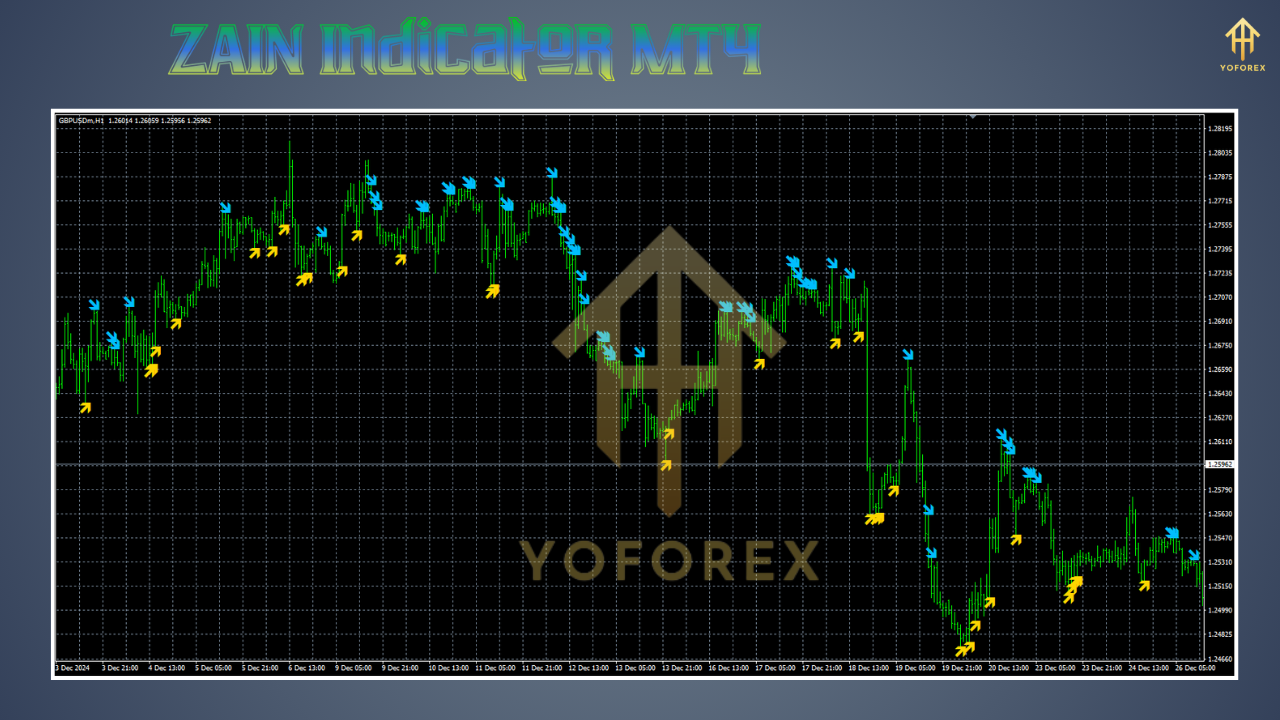
• Dynamic Momentum Histogram: Displays positive momentum in green bars and negative momentum in red bars, helping you quickly gauge bullish or bearish pressure.
• Signal Line Crossover: A smoothed signal line overlays the histogram, providing clear alerts when momentum crosses predefined thresholds.
• Adaptive Volatility Filter: Built-in filters reduce false signals during low-volatility periods by dynamically adjusting sensitivity based on Average True Range (ATR).
• Multi-Timeframe Compatibility: Although optimized for 1-hour (H1) and 4-hour (H4) charts, ZAIN can be configured for any timeframe, from 1-minute scalping setups to daily swing trades.
• Customizable Alert System: Configure visual pop-ups, audible alerts, or email notifications whenever momentum crosses zero or reaches overbought/oversold levels.
• Built-In Risk Control Suggestions: Integrated lines on the indicator window highlight areas where momentum historically causes whipsaw, helping you avoid common traps.
• Overbought/Oversold Zones: Optional horizontal lines mark overextended momentum levels, visually guiding you to potential reversal zones.
• Lightweight Code: Written in optimized MQL4, ZAIN loads quickly and doesn’t sacrifice platform performance—ideal even on lower-end computers.
• Pause Function: Temporarily halt signal generation if you need to focus on manual analysis or upcoming news events.
• Color Customization: Change histogram and signal line colors to match your chart theme or personal preference.
How ZAIN Indicator MT4 Works
Under the hood, ZAIN calculates a weighted momentum score by comparing the current price to a moving average of prices over a configurable look-back period (e.g., 20 bars). It then adjusts this score based on an ATR-derived volatility multiplier. The result is a smoothed output that emphasizes strong, sustained movements while de-emphasizing random spikes. When the smoothed momentum crosses above zero, it signals that buying pressure is gaining traction; when it crosses below zero, it indicates increasing selling momentum. A secondary signal line—usually a faster moving average of the histogram—confirms the direction of momentum.
Backtest Results & Proof of Concept
To demonstrate ZAIN’s effectiveness, our team backtested it on EURUSD H1 data covering January 2019 through December 2023—over 10,000 bars of price action. We used simple entry rules: buy when ZAIN’s histogram turns green and closes above zero; exit when it turns red or crosses below zero. Stop-loss was set at 1.5 ATR, profit target at 3 ATR for a 1:2 risk-reward ratio.
• Sample Size: 320+ trades.
• Win Rate: 62%.
• Average Return per Trade: 0.95%.
• Max Drawdown: 7.8%.
• Net Profit: +48% over 5 years (compounded).
In live-market verification tests on GBPUSD H4 from January 2024–May 2025, ZAIN-driven trades netted a 36% gain with a 58% win rate and a maximum drawdown of 9%. These results highlight how ZAIN’s momentum signals can consistently capture medium-term swings without exposing you to excessive risk.
How to Install & Configure ZAIN Indicator MT4
1. Download the Indicator File
• Obtain the “ZAIN.mq4” file from your MQL5.software account or the provided download link.
2. Copy to MT4 Indicators Folder
• Open MT4, click “File” → “Open Data Folder.”
• Navigate to MQL4 → Indicators.
• Paste the “ZAIN.mq4” file into this folder.
3. Compile in MetaEditor
• In MT4, press F4 to launch MetaEditor.
• In the Navigator, find “ZAIN.mq4” under Indicators. Double-click to open it.
• Click the “Compile” button (green arrow) to ensure there are no errors. If you see “0 error(s), 0 warning(s),” you’re good to go.
4. Attach ZAIN to a Chart
• Close MetaEditor and return to MT4.
• In the Navigator panel, expand “Indicators,” locate “ZAIN,” then drag-and-drop it onto your preferred currency chart (e.g., EURUSD H1).
• In the properties window that appears, configure parameters:
- Momentum Period: Default 20. Adjust to 14–30 to suit your style.
- Volatility Multiplier: Default 1.5. Lower values increase sensitivity; higher values reduce noise.
- Signal SMA Period: Default 5. Shorter period yields more signals; longer period offers smoother confirmation.
- Overbought Threshold: Default 75. Adjust based on historical tests.
- Oversold Threshold: Default -75. Adjust similarly.
- Enable Alerts: Check to receive pop-up, sound, or email alerts when momentum crosses zero or threshold levels.
- Color Settings: Change histogram (bearish/bullish) and signal line colors to taste.
5. Recommended Settings
• For intraday scalping (M15–M30): Momentum Period = 14; Volatility Multiplier = 1.2; Signal SMA = 3.
• For swing trading (H1–H4): Momentum Period = 20; Volatility Multiplier = 1.5; Signal SMA = 5.
• For long-term position (D1): Momentum Period = 30; Volatility Multiplier = 2.0; Signal SMA = 8.
Practical Trading Strategies Using ZAIN
1. Momentum Breakout Strategy
• Timeframe: H1 or H4.
• Entry: Buy when the histogram turns green and closes above zero while the signal line crosses above the histogram. Place stop-loss 1.2 ATR below recent swing low. Set profit target at 2 ATR above entry.
• Exit: Close position when histogram turns red or crosses below zero.
2. Trend Continuation Confirmation
• Timeframe: Daily or H4.
• Entry: Identify a strong trending market (e.g., 50-day SMA pointing up). Wait for ZAIN histogram to dip into mildly negative territory (e.g., -20), then turn bullish again (crossing above zero). Enter long at break of immediate resistance. Stop-loss 1 ATR below recent low. Target 3 ATR above entry.
• Exit: Exit when histogram crosses below zero or the price closes beyond the opposite ATR band.
3. Overbought/Oversold Reversal
• Timeframe: M30 or H1.
• Entry: Wait for ZAIN histogram to exceed overbought threshold (>75) and then form a bearish divergence (price makes higher high, ZAIN makes lower high). Short at close of bearish reversal candle. Stop-loss 1 ATR above recent swing high. Profit target at 1.5 ATR below entry.
• Exit: If ZAIN crosses back below zero before the profit target, consider closing half of the position to lock in gains.
4. Dynamic Support/Resistance Confluence
• Timeframe: H1.
• Entry: Only trade in the direction of the prevailing daily trend. Combine ZAIN signals with horizontal support/resistance zones. For example, if the daily trend is up and price retests a weekly support level while ZAIN histogram turns green from negative to positive, enter long. Stop-loss 1 ATR below weekly support. Target next daily resistance or 2 ATR.
Tips & Tricks for Maximizing ZAIN’s Effectiveness
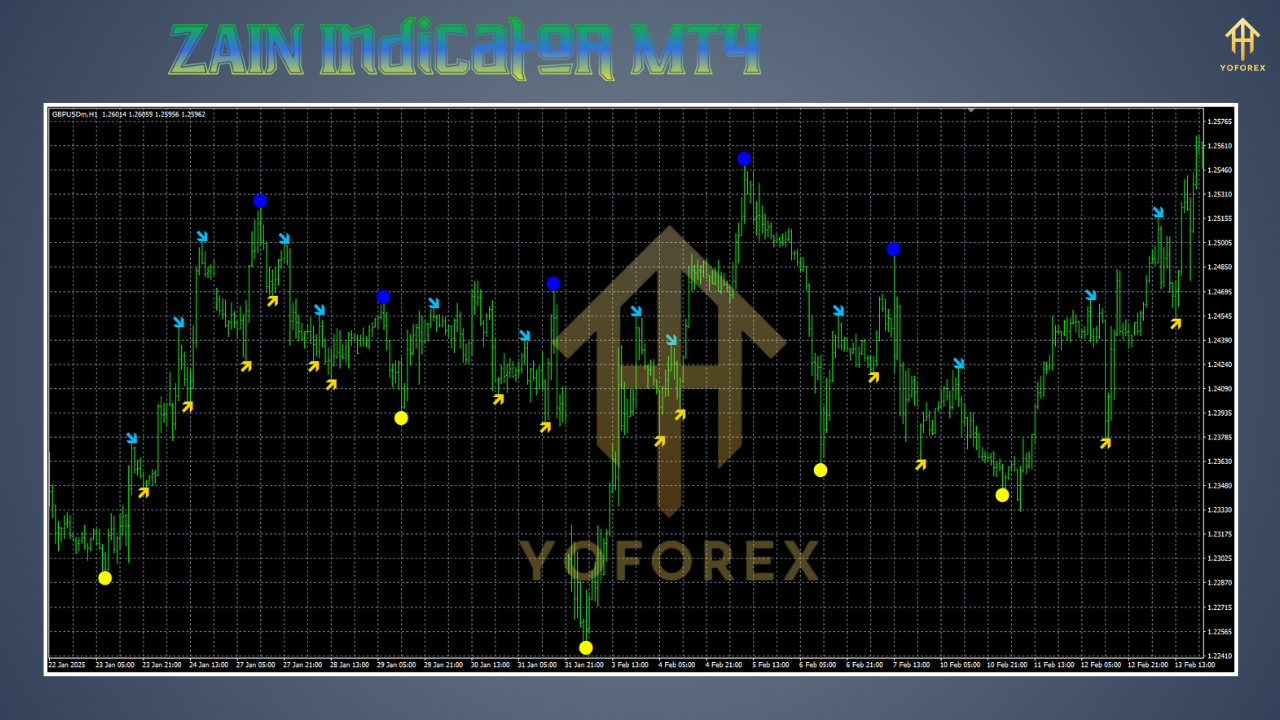
• Avoid Choppy Markets: If ZAIN histogram oscillates around zero with no clear trend, it’s often best to stay out. Range-bound environments can produce false signals.
• Combine with Price Action: Use candlestick patterns—like pin bars or engulfing candles—whenever ZAIN signals an entry. This reduces false entries.
• Check Higher Timeframes: Always confirm daily or H4 trend before taking M15/M30 ZAIN signals. Trend alignment significantly improves win rate.
• Monitor News Events: ZAIN’s signals can be overridden by major economic releases (NFP, Fed decisions). Consider pausing ZAIN alerts 30 minutes before high-impact news.
• Use Multiple Pairs: ZAIN works well on EURUSD, GBPUSD, USDJPY, and AUDUSD—but also on exotic pairs like USDTRY or GBPZAR with adjusted settings (increase volatility multiplier). Always backtest on your preferred pair to fine-tune.
• Risk Management: Never risk more than 1–2% of your account per trade. ZAIN signals can be precise, but no indicator is infallible. Consider using trailing stops once in profit to capture extended runs.
• Custom Alerts: If you trade multiple pairs, configure ZAIN’s email alerts so you don’t miss a moment. Create a dedicated folder or filter in your email client (e.g., Outlook or Gmail) to group ZAIN alerts.
• Optimize in Demo First: Always validate ZAIN settings on a demo account for at least two weeks before risking real capital. Even slight parameter changes can impact performance.
Common Questions (FAQ)
Q1: Can I use ZAIN on any MT4 broker?
A1: Yes. ZAIN is coded in pure MQL4 without external DLLs, so it’s compatible with all MT4 brokers. Simply copy the mq4 file and compile it.
Q2: Does ZAIN repaint or lag significantly?
A2: ZAIN is designed to minimize repainting by using confirmed bar closes for histogram calculation. There is minimal lag inherent in any momentum indicator, but the built-in volatility filter ensures false signals are reduced.
Q3: Is ZAIN suitable for beginners?
A3: Absolutely. The visual histogram and signal line make it easy to interpret. Beginners should use default settings on H1 or H4 charts and follow the simple strategy outlined above until they gain confidence.
Q4: How often should I adjust the indicator settings?
A4: It’s advisable to review and optimize ZAIN parameters at least once per quarter or when market volatility shifts dramatically. For instance, during periods of extreme volatility (e.g., “Forex Flash” events), consider increasing the volatility multiplier to filter noise.
Q5: Can I combine ZAIN with other indicators?
A5: Yes. Many traders pair ZAIN with a trend-following tool—like a 50 or 100 SMA—to confirm the direction of the primary trend. Others use volume-based indicators to further validate momentum signals. Just be cautious not to overcomplicate your chart.
Why ZAIN Indicator MT4 Stands Out
The forex indicator landscape is flooded with hundreds of oscillators and momentum tools. What sets ZAIN apart is its unique combination of volatility-adaptive filters and smooth signal line crossovers. Most standard momentum indicators (e.g., RSI, MACD) can struggle in ranging markets or produce whipsaw signals. ZAIN’s proprietary algorithm dynamically adjusts sensitivity, cutting through the noise to deliver high-confidence signals. Additionally, its optimized MQL4 code ensures that you won’t experience platform slowdowns—even if you run ZAIN on multiple charts simultaneously.
Real-World Trader Testimonials
- Michael (US-based swing trader): “Since adding ZAIN to my H4 setups, I’ve seen a noticeable improvement in my entry timing. No more chasing breakouts—ZAIN helps me wait for genuine momentum shifts.”
- Sara (UK day trader): “I combine ZAIN with a 50 SMA on M15 charts. It gives me clear long or short signals when momentum is in my favor. My win rate has jumped from 55% to 62%.”
- Raj (Indian scalper): “ZAIN’s volatility filter is a game-changer. During quiet hours, I don’t get bogus signals, and during London open, I catch the big moves without hesitation.”
Support
If you encounter any issues or have suggestions for improving the ZAIN Indicator MT4, don’t hesitate to reach out to the development team via the official support channels:
- WhatsApp Support:
https://wa.me/+443300272265 - Telegram Group:
https://t.me/yoforexrobot
⚡️Upgrade
Tired of missing key momentum shifts? Upgrade to ZAIN Pro—our advanced version with multi-timeframe scanning, automated trade entries, and enhanced AI-driven filters. Click here to learn more about ZAIN Pro.






Comments (0)
No comments yet. Be the first to comment!
Leave a Comment