Virtual Grid Mart Dual Sides EA V1.0 MT5 – Parallel Buy/Sell Grids with Virtual Trades, ATR Steps, and Full-Account Protection
If you love grid logic but hate flying blind, Virtual Grid Mart Dual Sides EA V1.0 MT5 is your kind of beast. It runs BUY and SELL grids in parallel, lets you tune each side independently, and adds Virtual Trade Technology (VTT) so you can “dry-run” placements before real orders hit the book. Fixed pip steps? Cool. Adaptive ATR spacing? Even better—let volatility set the rhythm. And when it’s time to get spicy, there’s an advanced martingale system (multiplier or additive) with strict max-lot ceilings plus a real-time equity stop to protect the entire account.
This isn’t a fire-and-forget toy—grids are powerful but demand rules. The good news: this EA gives you rules for everything… from hour-by-hour schedules to an automatic redeploy feature that can relaunch with a simulated balance after a hard stop—useful if you’re running aggressive growth configs and want a preplanned recovery protocol.
What makes it different (in plain English)
- Two grids, zero cross-talk: Run a BUY grid and a SELL grid simultaneously with separate steps, TPs, multipliers/caps, and time windows. Bullish on one side, hedged on the other? You do you.
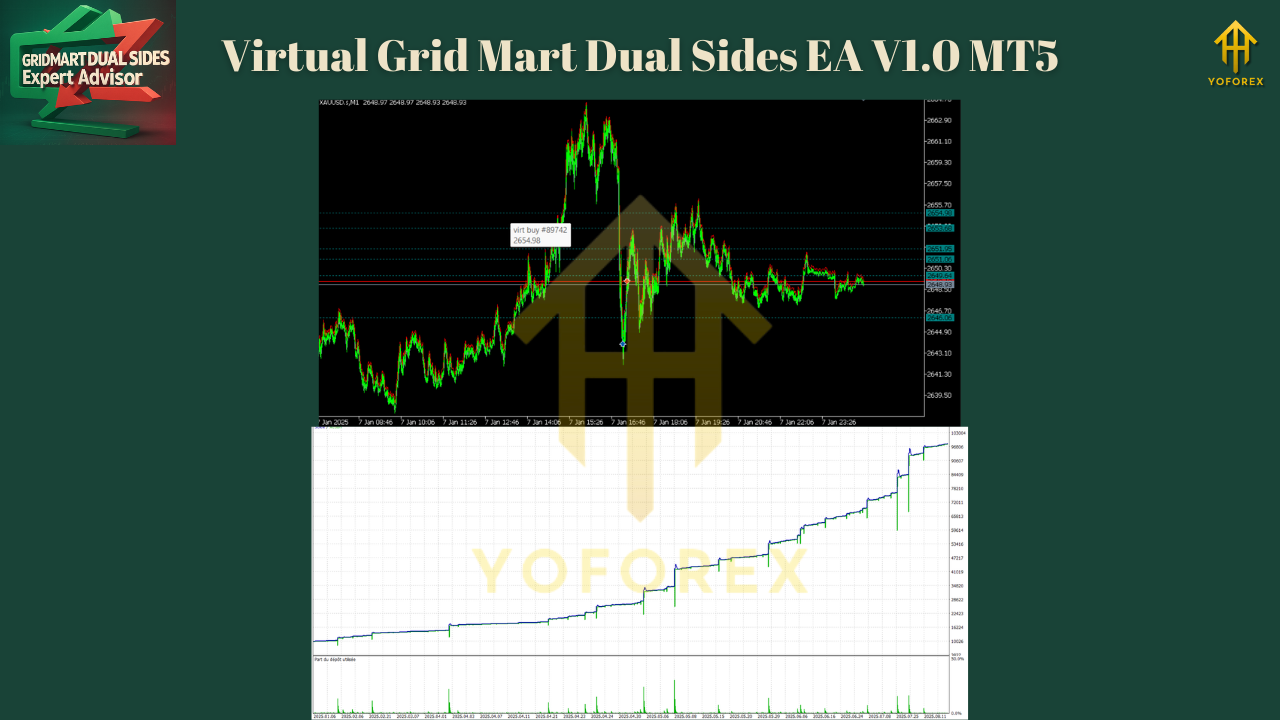
- Virtual first, real second: VTT stages “paper” orders in live conditions so you can see how a ladder would behave—then the EA promotes to real tickets only when rules say go. It’s like practicing the dance before stepping on stage.
- Fixed or adaptive spacing: Choose fixed steps (e.g., 100 points) or ATR-based steps that expand/contract with volatility, so your ladder isn’t too dense in chaos or too sparse in calm.
- Martingale, but with a seatbelt: Use multiplier or addition styles. Cap exposure via max lot (hard limit) or proportional rule (lot cap scales with balance). If you’re gonna martingale, do it with brakes.
- Whole-account guardrail: A built-in equity stop watches total P/L in real time and closes everything at your loss threshold (percent or currency). Because living to trade tomorrow > “one more grid.”
- Work hours, not 24/7 stress: Define active hours per weekday for each side. Avoid rollover spreads, news windows, or dead liquidity pockets—your schedule, your rules.
- Auto-redeploy (optional): After a Hard SL event, you can instantly restart with a simulated deposit. This is for advanced/aggressive profiles—plan the reset before emotions kick in.
- Runs anywhere: Any asset, any timeframe, any account type (Standard, ECN, etc.). Author provides optimized set files on request via MQL5 chat.
How it works (flow)
- Environment check: Spread, slippage, session window, and equity guard must pass.
- Signal posture: You decide if grids are always-on, direction-biased (manually or via filters), or paused outside chosen hours.
- Step engine: Places virtual rungs using fixed or ATR-scaled spacing. The ATR mode recalculates dynamically to keep density sensible during volatility spikes.
- Promotion to real: When price touches a virtual rung and guardrails pass, the EA promotes to real orders (market or pending, per your config).
- Martingale logic: On adverse movement, the EA can scale per your rule (multiplier or additive), abiding by max-lot caps and exposure limits.
- Exit policy: Per-rung TPs, basket TP/BE, trailing by ATR, or time-based exits.
- Account protection: If equity hits your hard stop, the EA flattens all and (optionally) auto-redeploys with simulated balance.
Configuration highlights
Per-side controls (BUY / SELL):
- Step model: Fixed pips or ATR-adaptive (with min/max bounds)
- TP model: per-rung TP, basket TP, %-of-ADR target, or time-boxed
- Martingale: multiplier (e.g., x1.3/x1.5) or addition (e.g., +0.02 lots)
- Caps: max lots, max rungs, max exposure (in lots or % balance)
- Filters: spread/slippage guards, time-of-day, day-of-week
- Safety: distance to news (via stub), pause after daily loss, cool-down between new rungs
Global protection:
- Equity stop (%, currency) with instant close-all
- Daily/weekly loss pause (optional)
- Auto-redeploy: On/Off, simulated deposit size, cool-down minutes
Quality-of-life:
- On-chart panel: live exposure, free margin, grid density, next rung levels
- Detailed logs: placement reasons, promotion events, safety vetoes

Setup (quick start)
- Attach the EA to your instrument (e.g., XAUUSD M5/M15, NAS100 M1/M5, EURUSD M15… anything).
- Pick BUY and/or SELL grid ON, then set step model (try ATR with bounds like 0.5×–1.5× ATR(14)).
- Choose martingale style (start additive for gentler ramp; multiplier later if you know the ride).
- Set per-side max lots and a global equity stop (e.g., 8–12% for testing, lower for live).
- Define active hours—avoid rollover and big scheduled news at first.
- Start with VTT only (virtual placements) for a session to observe behavior; then allow promotions to real orders.
- Forward-test on demo for at least a week across sessions. Then go live small and scale slowly.
Best-practice playbooks
Conservative (hedged, mean-revert bias)
- Timeframe: M15/H1
- ATR steps with wider min spacing; additive martingale
- Per-side max rungs modest (e.g., 5–7)
- Equity stop 5–8%, daily loss pause ON
- Use only one active session (London or NY) to limit compounding risk
Moderate trend-aware
- Timeframe: M5/M15
- ATR steps medium, switch SELL grid OFF when trend filter says “strong up,” and vice-versa
- Additive early, small multiplier late (e.g., x1.2 cap)
- Basket TP at % of ADR
Aggressive compounding (experts only)
- Timeframe: M1/M5 on high-beta symbols
- Tighter ATR bounds, multiplier martingale with hard max lot
- Auto-redeploy ON after Hard SL with simulated seed
- Narrow trading hours to liquid windows; accept larger equity swings
Risk talk (the candid bit)
This is a grid + martingale–capable system. Even with VTT and guardrails, grids can balloon exposure during persistent one-way trends. That’s why the EA ships with equity stops, max rungs, max lots, and schedules. Use them. Start tiny, validate in demo, then size up. If you’re new to grids, stick to additive scaling first and keep step sizes sensible. No EA can repeal physics (or thin-liquidity gaps).
Frequently asked (quick)
Does it work on any asset/timeframe?
Yep. That said, run author set files (ask via MQL5 chat) or do a local tune—tick size/contract specs vary.
Is VTT just a visual?
No—it’s a logic layer simulating placements in real time. Promotions only happen when rules pass.
Can I run BUY and SELL together?
Yes, they’re isolated: separate IDs, limits, hours, and caps.
What about news?
There’s a light news-filter stub you can extend. Safer path: turn grids off around big releases or widen ATR bounds.
Prop firms?
Grids can conflict with prop DD rules. Use tight equity stops, small rungs, additive scaling, and restricted hours. Pilot on demo first.
How to get optimized sets
The author provides asset-specific set files. Ping via MQL5 integrated messaging to request configs for your symbol (indices, gold, majors, etc.). Always sanity-check vs your broker’s digits, tick size, contract size, and margin—and forward-test.
Support & Contact
Need help tuning steps or equity stops?
- WhatsApp: https://wa.me/+443300272265
- Telegram: https://t.me/yoforexrobot
- MQL5 Chat: Message the author to request optimized set files.
Call to Action
Want parallel BUY/SELL grids that think before they act, with virtual placements, ATR-smart spacing, and account-level protection? Grab Virtual Grid Mart Dual Sides EA V1.0 MT5, start in VTT mode, tune your caps, and let the engine work—carefully, methodically.
YoForex – empowering traders worldwide, one free tool at a time.
Join our Telegram for the latest updates and support






Comments (0)
No comments yet. Be the first to comment!
Leave a Comment