Introduction to TWC Genesis EA V1.0 MT4
Forex trading is evolving, and so are the tools traders use to gain an edge in the market. Among the new generation of intelligent Expert Advisors, the TWC Genesis EA V1.0 MT4 has emerged as a dynamic solution built for performance, precision, and profit. Whether you're a scalper, day trader, or swing trader, this automated trading system offers a wide spectrum of features to support your trading style on the MetaTrader 4 platform.
In this blog, we’ll dive deep into the capabilities of TWC Genesis EA, its working mechanism, ideal settings, and how it empowers traders with automation to thrive in the ever-changing forex markets.
What is TWC Genesis EA?
TWC Genesis EA V1.0 is a fully automated Expert Advisor designed to trade major forex pairs using a blend of technical indicators, price action analysis, and adaptive risk management. Developed with smart entry-exit logic and multiple timeframe confirmation, the EA attempts to capture low-risk, high-reward trades while minimizing drawdowns.
Basic Details:
- Timeframe: M15 and H1 (recommended)
- Currency Pairs: EURUSD, GBPUSD, XAUUSD (Gold), USDJPY, and US30
- Trading Style: Semi-aggressive intraday trading
- Platform: MetaTrader 4
- Minimum Capital: $300
- Leverage: 1:500
- Account Type: Hedging (preferred)
- Broker Type: ECN with fast execution
- VPS Required: Yes (for 24/5 operation)
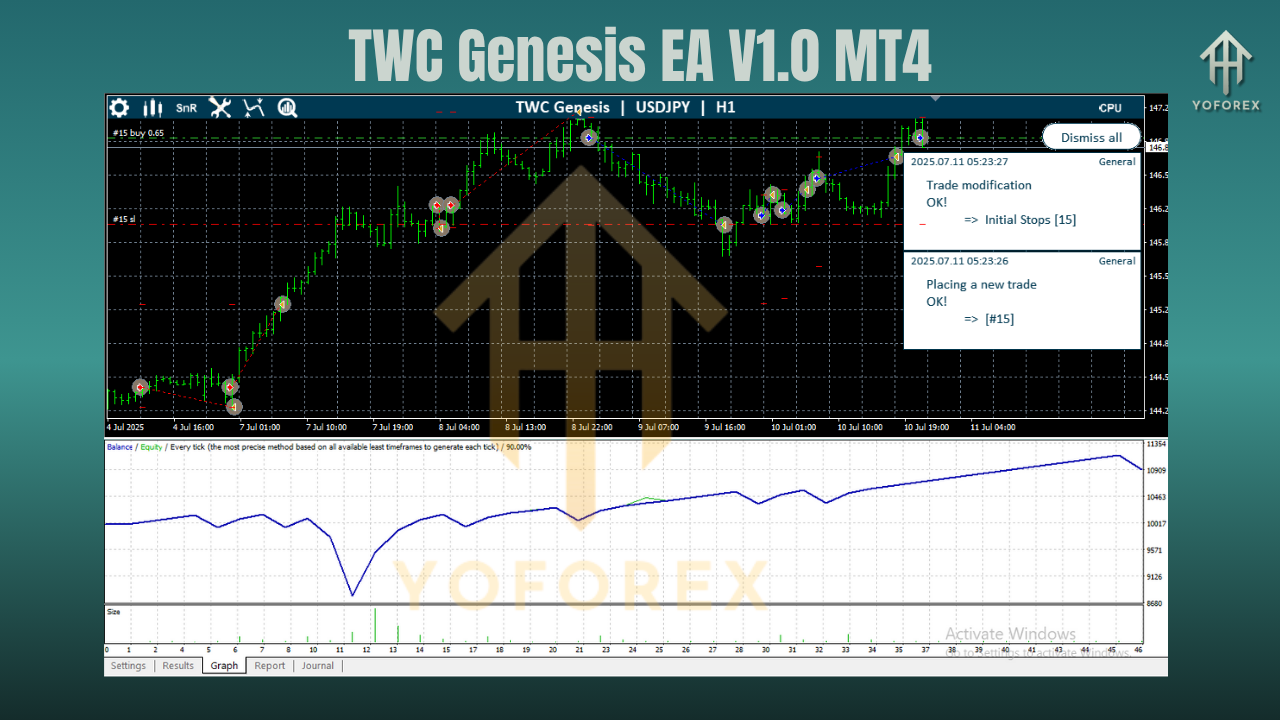
How Does TWC Genesis EA Work?
TWC Genesis EA is powered by an internal algorithm that combines signal generation, trend confirmation, and risk mitigation. It works in the following steps:
1. Signal Detection
The EA uses built-in indicators (custom RSI, MACD crossover logic, and moving average filters) to scan for potential trade entries. It waits for confluences across indicators to trigger a buy or sell signal.
2. Multi-Timeframe Confirmation
Before executing a trade, the EA checks the higher timeframe (e.g., if on M15, it checks H1 or H4) to confirm trend direction, avoiding entries that go against the broader market structure.
3. Dynamic Entry Execution
Once confirmed, the EA places trades with calculated lot sizes and stop loss/take profit levels. It supports:
- Fixed lot or auto lot based on account size
- Breakeven protection
- Partial profit-taking
4. Trade Management
The EA actively manages open trades using:
- Trailing stops
- Volatility filters
- News filters (optional)
- Time-based exit logic (e.g., close by end of trading session)
This ensures maximum profit protection and loss minimization even in volatile or sideways markets.
Key Features of TWC Genesis EA V1.0
Smart Entry Logic
The EA avoids overtrading by only entering when multiple signals align, increasing trade accuracy.
Risk Management Suite
Includes max drawdown limit, daily equity loss protection, and auto lot scaling based on risk appetite.
News & Session Filters
You can set the EA to pause during high-impact economic news or outside active trading sessions, reducing unnecessary risk.
Adaptable Strategy
The EA can switch between scalping and trend-following logic based on market condition detection.
Stealth Mode (Optional)
For traders using prop firm accounts or restrictive brokers, the EA can hide SL/TP levels and use virtual management.
Best Settings for TWC Genesis EA
Here’s a sample configuration that balances risk and reward:
- Timeframe: M15 (aggressive) or H1 (conservative)
- Pairs: EURUSD, XAUUSD, USDJPY
- Lot Size: Auto (0.01 per $300 balance)
- Max Open Trades: 3
- Take Profit: 30–50 pips
- Stop Loss: 20–35 pips
- Trailing Stop: Enabled
- Trade Days: Monday to Friday
- News Filter: On
- Session Filter: London & New York only
- Risk Mode: Medium
These settings work well for most retail accounts but can be optimized further through backtesting.
Performance Overview
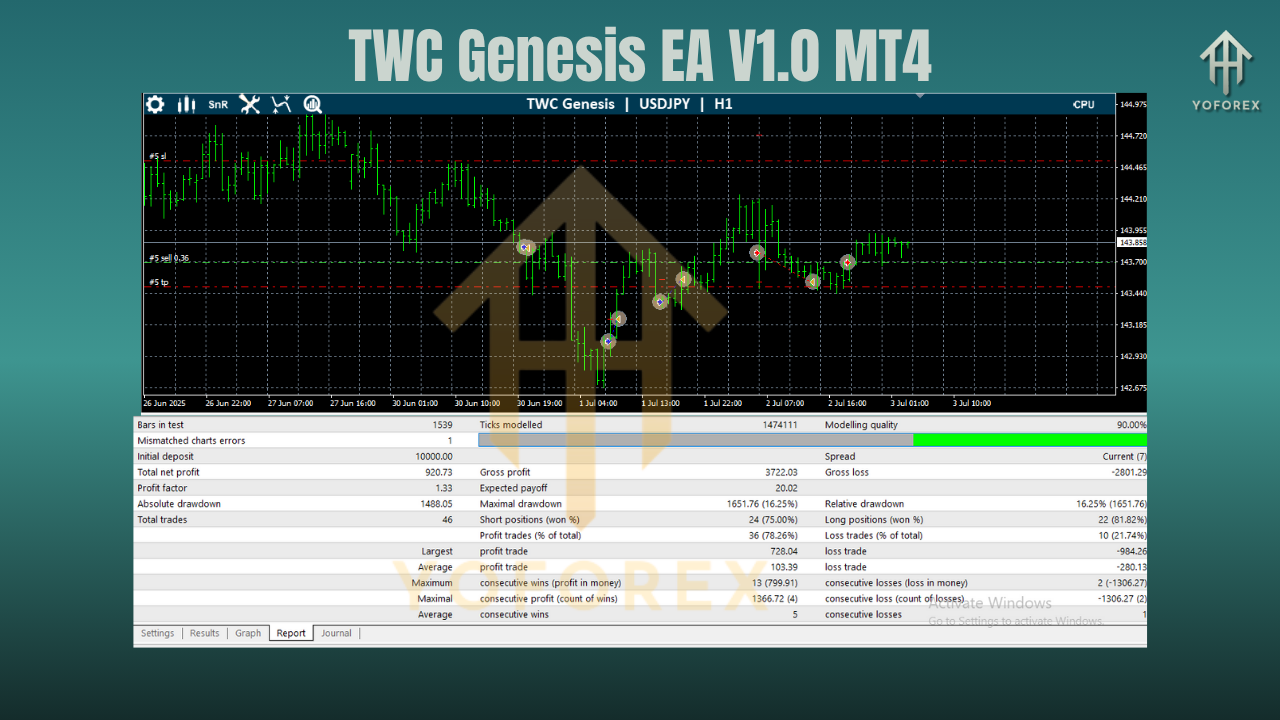
While results may vary depending on market conditions and broker performance, here are typical outcomes from backtests and forward tests:
- Monthly ROI: 10–18%
- Max Drawdown: Below 15%
- Win Rate: 70–78%
- Trade Frequency: 5–15 trades per week
- Best Time of Day: London open to New York close
- Recommended Broker: IC Markets, Pepperstone, RoboForex
TWC Genesis EA has demonstrated strong consistency in both trending and ranging markets, particularly with Gold and EURUSD.
Why Traders Prefer TWC Genesis EA
Here are the top reasons traders choose this EA:
- 1. Versatility Across Pairs and Timeframes
- It performs well on both forex majors and commodities like gold, giving traders the freedom to diversify.
- 2. Stress-Free Trading Experience
- Fully automated operation with user-friendly configuration—perfect for beginners and advanced traders alike.
- 3. Prop Firm Ready
- With low-risk settings and rule-based trading, it's an excellent tool for FTMO, MyForexFunds, and similar evaluations.
- 4. Built-In Protection
- Equity stop-loss and drawdown control protect your capital, even in unpredictable markets.
- 5. Real Community Feedback
Early adopters report reliable performance, intuitive dashboard, and responsive developer support.
How to Get Started
Follow these simple steps to install and run the EA:
- Download the
.ex4file from the official source. - Open MetaTrader 4 and go to File > Open Data Folder.
- Navigate to MQL4 > Experts and paste the EA file.
- Restart MT4 and attach the EA to your preferred chart (M15 or H1).
- Enable Auto Trading and allow DLL imports.
- Configure your settings as per your risk preferences.
- Watch the EA operate and review performance through the on-screen panel.
Final Thoughts
TWC Genesis EA V1.0 MT4 is a next-gen forex trading bot built for smart traders who demand precision, automation, and adaptability. Whether you're managing your personal account or preparing for a prop firm challenge, this EA provides the tools needed to perform consistently.
It’s beginner-friendly yet powerful enough for advanced users. With a solid backtest record and intelligent logic, the Genesis EA lives up to its name—marking the genesis of your automated trading journey.
Join our Telegram for the latest updates and support






Comments (0)
No comments yet. Be the first to comment!
Leave a Comment