Trigger Zone EA V1.0 MT5 — Clean Daily Breakouts with Built-In Discipline
Want a breakout EA that actually respects risk and your trading hours? Trigger Zone EA V1.0 (MT5) is a modular, transparent system built for daily high/low breakouts with smart trend filters, adaptive trailing, and strict profit/loss guards. It works on all instruments, but really shines on indices like US100 (NASDAQ 100) and US30 (Dow Jones). If you’re deploying it on FX, metals, or crypto, you’ll get the best results by optimizing custom parameters for that market’s volatility profile.
Below you’ll find what it does, how to configure it, and a battle-tested setup playbook—so you can trade the daily expansion phase without overtrading or getting chopped up by fake breaks.
Why Daily Breakouts (and why indices)?
Daily highs/lows capture the session’s expansion after a pre-market build-up. Indices like US100 and US30 tend to print clean opening impulses when cash markets kick in, which makes them ideal for systematic breakout logic. The catch? False breaks, spread spikes, and overtrading. That’s where Trigger Zone’s risk tooling steps in: trend filters to skip low-quality moves, adaptive trailing to keep what you’ve earned, and daily PL protection to shut things down before damage compounds.
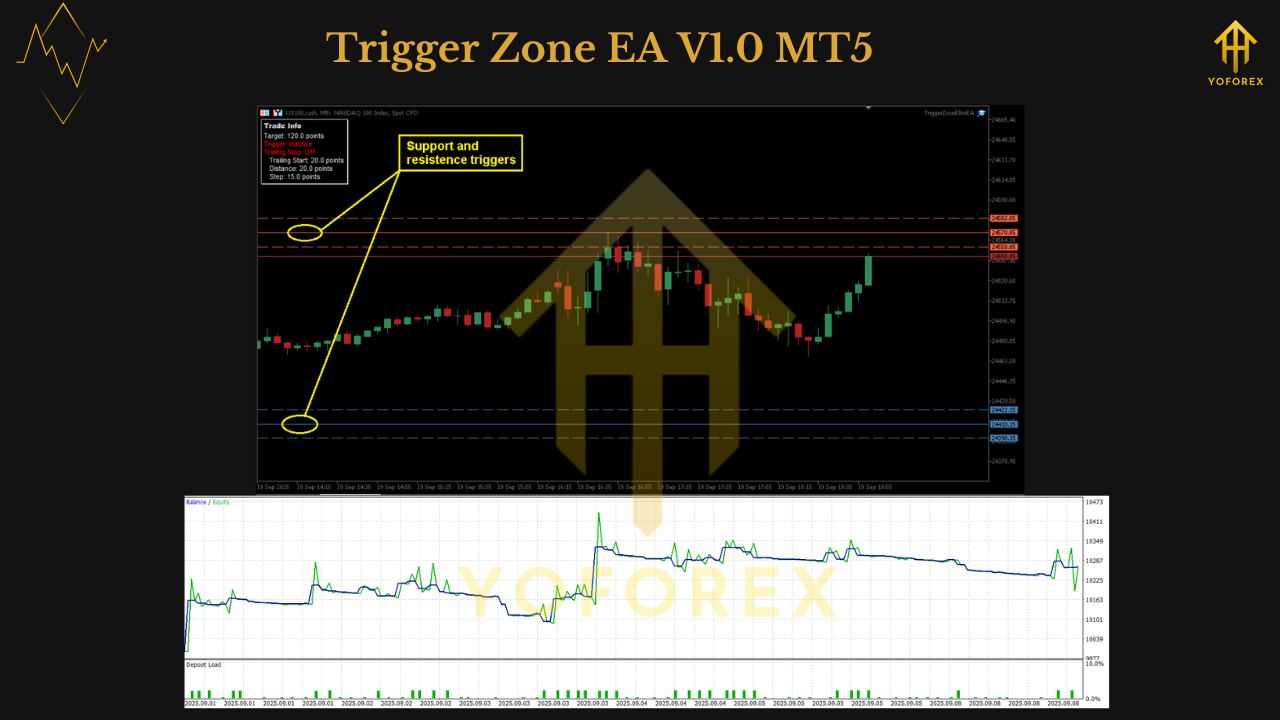
Key Features (at a glance)
- • Breakout entries of daily highs/lows: Trades the first acceptance beyond the prior day’s extremes or your defined “trigger zone.”
- • Smart trend filters: Slope/volatility/structure checks to avoid counter-trend pokes and lunchtime chop.
- • Adaptive Trailing Stop: Tightens as momentum matures; lets early profits breathe, then locks them.
- • Daily profit & loss protection: Hard daily guardrails—hit target or drawdown and the EA stands down.
- • Trading session control: Define start/stop; the EA auto-closes at session end to avoid overnight risk if you want.
- • Modular structure & detailed logs: Every step is logged, so you can audit decisions and tune with confidence.
- • Instrument-agnostic: Works on indices/FX/metals/crypto; optimize for non-index markets.
How Trigger Zone thinks (plain English)
- Mark the levels: The EA maps the previous day’s high/low (or a custom pre-market range).
- Wait for acceptance: A simple wick through the level isn’t enough; filters require close/structure confirmation before arming entries.
- Check regime/trend: A trend filter (e.g., MA slope + volatility context) gates trades that fight the bigger move.
- Risk the trade: Lot size uses fixed lot or risk-% with a volatility-scaled SL (ATR or equivalent).
- Manage winners: Adaptive trailing firms up as price expands; you can also set partial take-profit at 1–1.5R.
- Respect the day: If DailyTP or DailyMaxLoss is hit, or at session end, the EA flattens/halts. That’s discipline… on autopilot.
Recommended starter profiles (US100 / US30)
These are sensible baselines. Always forward-test and adapt to your broker.
Timeframe: M5 or M15 (for entries), with daily levels referenced internally.
Broker/account: ECN/RAW-style index CFDs with consistent spreads/commissions.
Leverage: Whatever your broker offers—risk via position size, not leverage itself.
VPS: Yes—indices move fast around open; stability matters.
US100 (NASDAQ 100)
- Session window: 30–60 min after cash open (skip the first 5–10 min if fills are wild).
- Risk per trade: 0.5% (start here).
- SL: 1.5–2.0 × ATR(14) on entry timeframe.
- TP/exit: Partial at 1–1.5R, then adaptive trail; or 2.0R fixed if you prefer simplicity.
- Trend filter: On (moderate sensitivity).
- DailyPL guard: +2.0–3.0% TP, -2.0–3.0% MaxLoss.
US30 (Dow Jones)
- Session window: Similar to US100, but allow a slightly wider ATR multiple (volatility spikes differently).
- Risk per trade: 0.4–0.6%.
- SL/Trail: Same logic as US100; test a slower trail to avoid premature exits.
- DailyPL guard: Same band; adjust to your capital and pain tolerance.
Using it beyond indices (FX, Gold, Crypto)
- Optimization is key. Volatility patterns differ. Run a quick sweep on BB/ATR/trend filter windows to match the market.
- News handling: FX/Gold/crypto can gap through levels on data. Either pause near red news or widen the acceptance rule (e.g., require a bar close + minimum distance beyond the level).
- Spread caps: Tighten your max spread on thin sessions; you’d rather miss a trade than buy a bad fill.
Installation & setup (MT5)
- Download the EA file.
- MT5 → File → Open Data Folder → MQL5 → Experts → paste the file.
- Restart MT5; in Navigator → Experts, drag Trigger Zone EA V1.0 onto your chart(s).
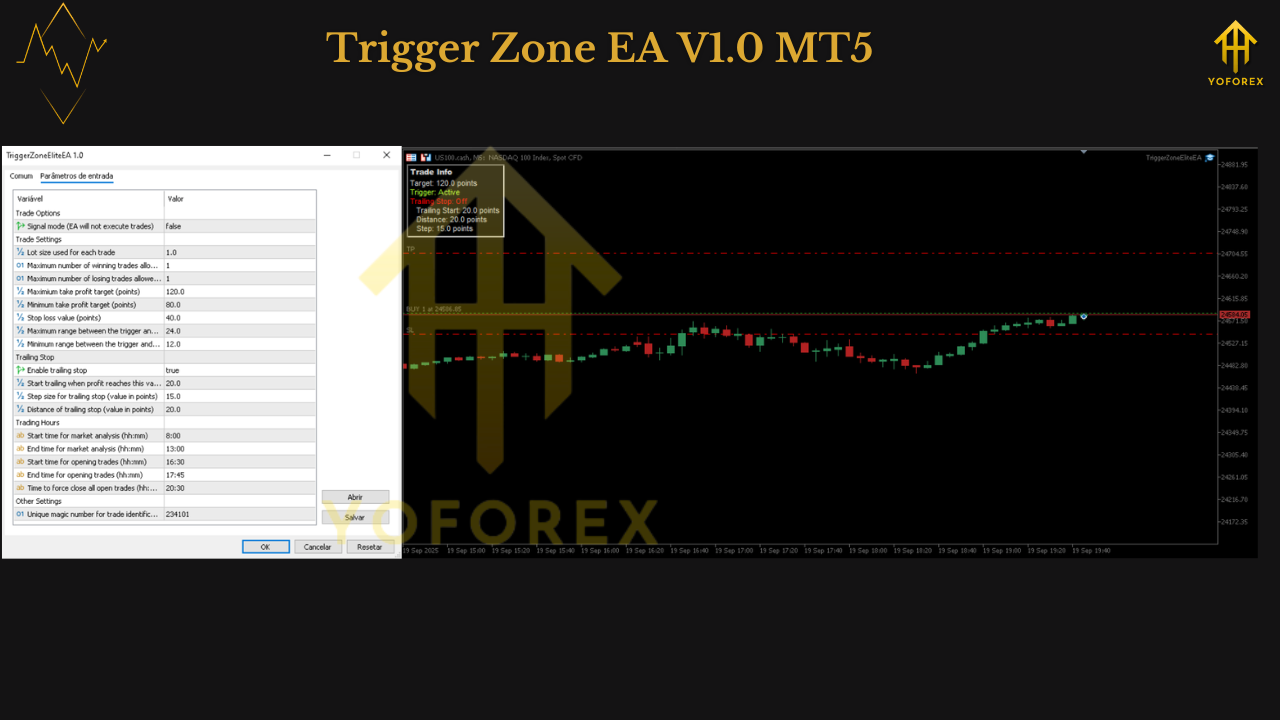
- Inputs to confirm:
- Risk model: Fixed lot or Risk % per trade.
- Trend filter: On (start moderate).
- ATR/volatility SL: 1.5–2.0 × ATR(14) as a baseline.
- Adaptive Trailing: Enabled; start with default or “medium” aggression.
- DailyTP / DailyMaxLoss: e.g., +2.5% / -2.5% (adjust to your rules/prop firm).
- Session control: Define open/close; enable auto-close at day end if desired.
- Max spread/slippage: Set realistic caps based on your broker.
- Turn AutoTrading ON.
- Forward test on demo for 2–4 weeks before going live.
Backtesting & forward-testing (do both)
- Backtest: Use tick/real-tick with realistic spread/commission. Cover multiple years including high-vol events. Focus on max DD, PF, average R, and win rate by weekday/session.
- Walk-forward: Split data into in-sample/out-of-sample; keep parameters stable across regimes.
- Forward demo: Same broker you’ll trade live. Watch execution at the break, slippage, and spread bursts around the open.
- Go live small: Start at half your demo risk for a couple weeks; scale only if fills match expectations.
Risk management playbook
- One or two bites per day is fine. Breakout days pay; chop days should be small scratches, not meltdowns.
- Daily guardrails are non-negotiable. If DailyMaxLoss hits, stop—the next session is another chance.
- Correlation awareness: If you run US100 + US30, cap total account risk (they often move together).
- No martingale, no grid. Let compounding work off real edge, not size escalation.
Tuning notes & troubleshooting
- Too many fake breaks? Tighten the acceptance rule (require a close beyond high/low and a minimum distance), or increase trend-filter strength.
- Exits feel too early? Use two-stage exits: partial at 1–1.5R, then a slower adaptive trail.
- Few trades? Loosen spread/slippage caps slightly, or broaden the session window (but keep risk tight).
- Equity swings too big? Cut risk %, narrow DailyTP/MaxLoss band, and avoid first minutes post-open.
Who will love Trigger Zone EA
- Index breakout traders who want structure + guardrails.
- Prop-firm candidates needing daily PL protection and session control.
- Systematic traders who value clean logs and a modular design for transparent tuning.
Who won’t: Grid/martingale chasers, or anyone expecting 0% drawdown. This is disciplined breakout trading, not magic.
Quick FAQ
Does it trade both directions?
Yes—breaks above the prior high (long) and below the prior low (short), subject to filters.
Can I hold overnight?
You can, but the default recommendation is auto-close at day end on indices to avoid gap risk.
What timeframe is best?
Use M5/M15 for execution and let the EA handle daily levels internally. D1 sets the reference; entries fire intraday.
Final word
Trigger Zone EA V1.0 MT5 systematizes what discretionary traders try to do every morning: respect the previous day’s extremes, trade the breakout only when the tape proves it—and manage risk like a pro. With trend filters, adaptive trailing, daily PL limits, session control, and full logs, it’s a breakout framework you can trust and tune. Start conservative, forward-test, and let the data guide your tweaks.
Disclaimer: Trading involves risk. Past performance is not a guarantee of future results. Always test on demo first and never risk money you can’t afford to lose.
Join our Telegram for the latest updates and support






Comments (0)
No comments yet. Be the first to comment!
Leave a Comment