StalkeR Arrow Indicator V7.80 MT4: A Powerful Price Action Trading Tool for Forex Traders
The world of forex trading can be complex, with countless indicators available to traders seeking to identify entry and exit points. Among these, StalkeR Arrow Indicator V7.80 MT4 stands out for its ability to provide clear buy and sell signals based on proven price action patterns and fractals. This tool has become increasingly popular among traders who value precision and reliability in their decision-making processes.
In this blog, we’ll dive deep into the features of the StalkeR Arrow Indicator, how it works, and why it’s becoming a favorite tool for both novice and experienced traders. Whether you’re using the MT4 platform for the first time or are a seasoned trader, this indicator promises to enhance your trading strategies.
Overview of the StalkeR Arrow Indicator V7.80 MT4:
The StalkeR Arrow Indicator is a versatile technical analysis tool that is designed to identify buy and sell signals on bar open or intra-bar. The core concept behind this indicator is the combination of price action patterns and fractals. It displays arrows on the chart that signal when to enter a trade, making it an excellent tool for traders looking for easy-to-follow visual cues.
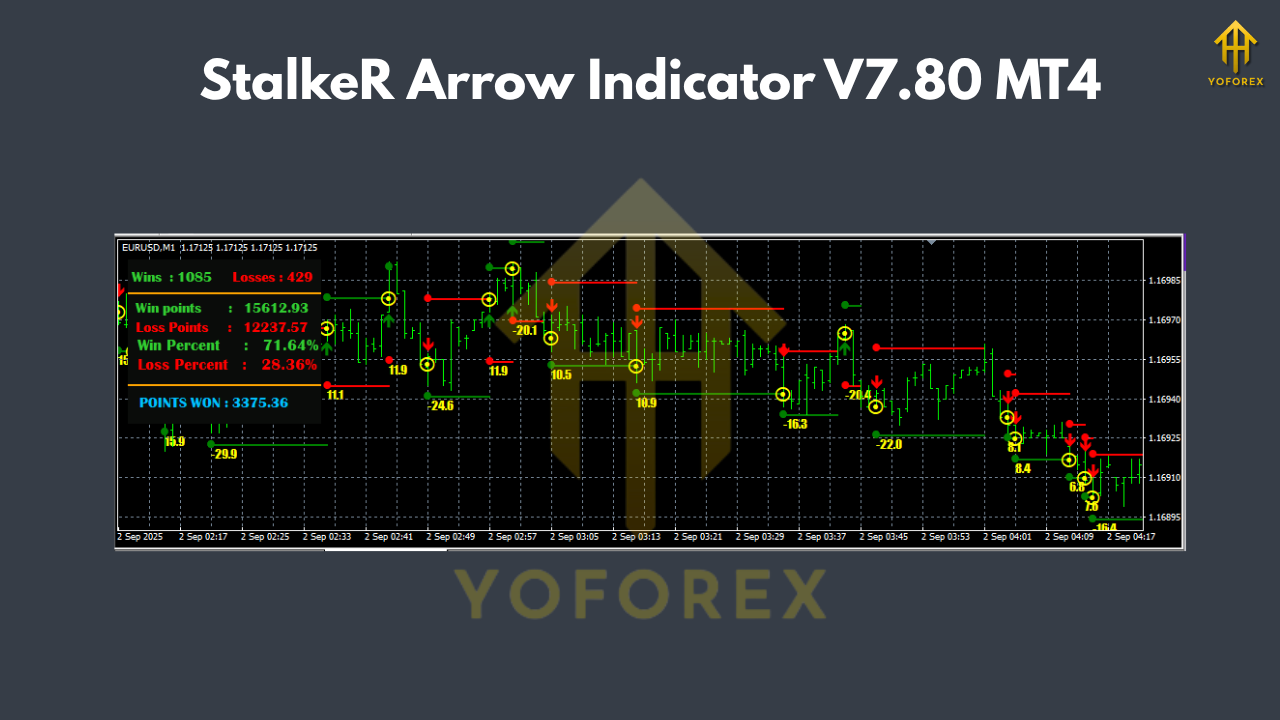
This indicator doesn’t just provide arrows; it also includes built-in Take Profit (TP) and Stop Loss (SL) levels for each trade signal. The TP and SL are represented as lines placed above and below the signals. These levels are adjusted as new signals are generated, making it easier for traders to manage their positions in real time.
Key Features of the StalkeR Arrow Indicator V7.80 MT4:
- Price Action and Fractal-Based Signals:
The indicator uses price action patterns and fractals to determine the most accurate entry and exit points. It doesn’t rely on complex mathematical formulas, which makes it highly reliable and easy to interpret. - Clear Buy and Sell Arrows:
The arrows displayed on the chart are clear and easy to interpret. A green arrow indicates a buy signal, while a red arrow signals a sell opportunity. This simplicity makes the indicator especially useful for beginners in forex trading. - Integrated Take Profit (TP) and Stop Loss (SL):
The StalkeR Arrow Indicator automatically places TP and SL levels, taking the guesswork out of trade management. These levels are dynamically adjusted, ensuring that traders can exit trades at the right moment to lock in profits or cut losses. - Backtesting Panel:
One of the standout features of this indicator is its built-in backtesting panel. This dashboard provides traders with detailed win/loss statistics from historical signals, giving them the ability to evaluate the effectiveness of the indicator before live trading. - Non-Repainting:
A critical factor for any indicator is whether it repaints or backpaints. The StalkeR Arrow Indicator does not repaint, ensuring that once a signal is generated, it will remain on the chart, providing a reliable and trustworthy system for decision-making. - Easy Installation:
Installing the StalkeR Arrow Indicator on the MT4 platform is straightforward. Simply download the indicator file, place it in the “Indicators” folder within your MetaTrader installation, and you’re ready to start trading. - Timeframes and Pairs:
The indicator can be used on any timeframe, making it highly versatile. Whether you trade on the M1, M5, H1, or daily charts, StalkeR Arrow Indicator adapts to your trading preferences. It works across various currency pairs, making it suitable for a wide range of forex traders.
How to Use the StalkeR Arrow Indicator V7.80 MT4:
- Install the Indicator:
Download and install the indicator on your MT4 platform. - Set Up Your Chart:
Open your preferred chart (e.g., EUR/USD, GBP/USD) and select your desired timeframe (e.g., H1 or M5). - Activate the Indicator:
After installation, drag the StalkeR Arrow Indicator from the “Navigator” window to your chart. You will immediately see buy and sell arrows appear based on the indicator’s analysis. - Follow the Signals:
When a green arrow appears, it’s a signal to buy. Conversely, when a red arrow appears, it’s a signal to sell. Use the TP and SL lines as your guide for trade management. - Monitor the Backtesting Dashboard:
The backtesting panel will help you assess past performance and refine your strategy based on historical data.

Benefits of Using StalkeR Arrow Indicator V7.80 MT4:
- Simplicity and Accuracy:
The indicator offers an intuitive, easy-to-understand trading system with accurate buy and sell signals. It eliminates the need for complex calculations, making it accessible to traders of all experience levels. - Effective Trade Management:
The TP and SL levels provided by the indicator help in effective trade management, reducing the emotional stress that often comes with decision-making. - Backtesting for Confidence:
The built-in backtesting panel allows traders to test the effectiveness of the indicator before live trading, providing peace of mind and a clearer understanding of potential risks. - Non-Repainting:
With the StalkeR Arrow Indicator, you can trust the signals you receive, as the indicator does not repaint or backpaint, ensuring consistency in your trading decisions.
Conclusion:
The StalkeR Arrow Indicator V7.80 MT4 is an invaluable tool for forex traders looking to simplify their trading strategies while maintaining accuracy and reliability. Whether you’re a beginner or a seasoned trader, the clear signals, automated trade management, and built-in backtesting features make this indicator a great addition to any trader’s toolkit. If you're looking for a simple yet powerful tool to boost your forex trading, the StalkeR Arrow Indicator is a must-try.






Comments (0)
No comments yet. Be the first to comment!
Leave a Comment