NanoScalp AI EA V1.0 MT5 – Fast, Low-Latency Scalping Power
Tired of overpaying for “premium” robots that ghost you the minute you need support? Same. That’s exactly why we built NanoScalp AI EA V1.0 MT5—a free, no-nonsense, AI-assisted scalper you can actually put to work today. It fires quick entries on GBPUSD, EURUSD, and XAUUSD, adapts to momentum shifts, and keeps risk tidy even when spreads wiggle. If you’ve been hunting for a prop-friendly tool that doesn’t blow up after a good week, you’ll vibe with this one. And coz it’s powered by YoForex, you get continuous updates, human support, and a community that helps you dial it in—no drama, no upsell traps.
Download NanoScalp AI EA on MQL5.software
Overview
NanoScalp AI EA V1.0 MT5 is a lightweight, low-latency Expert Advisor designed for scalping and fast intraday trades. It reads micro-structure (think: short bursts of volatility, micro pullbacks, and order-flow-like patterns) and combines them with adaptive filters to avoid dead zones. The EA supports H1, H4, M30, M15, M5, and M1. Real talk: you’ll see the best trade frequency and tightest execution on M1–M15, while M30–H1/H4 offer calmer trade cadence for those who prefer fewer, higher-probability setups.
Pairs it works best with out of the box:
- GBPUSD
- EURUSD
- XAUUSD (Gold)
Under the hood, NanoScalp AI EA blends short-term trend detection with volatility bands, session bias, and spread/latency gates. No martingale, no grid, no weird doubling down. Just straight entries, strict SL/TP, and an optional breakeven/partial close module. It’s fully back-tested and live-market verified by the YoForex team across multiple brokers; we iterate based on real user feedback, so it keeps improving over time.
Quick note: You can start on a $100–$300 account with 1:200–1:500 leverage, but always test on demo first. Different brokers = different spreads/slippage. Your job is to calibrate.
Key Features
- AI-assisted entry logic for micro-momentum and volatility breakouts
- No martingale, no grid—fixed or dynamic lots only
- Timeframe support: M1, M5, M15, M30, H1, H4
- Pairs: GBPUSD, EURUSD, XAUUSD (more pairs possible after forward tests)
- Prop-friendly risk profile with built-in daily loss guard
- Spread & slippage filters to avoid bad fills in news spikes
- Session filter (London/NY focus) with optional Friday close-out
- Dynamic stop loss based on ATR and recent swing structure
- Partial close & breakeven to lock profits early when the tape thins
- Auto-lot sizing by account balance or fixed-lot mode for tight control
- News-time pause option (manual schedule) for calm execution around events
- Clean journal & comments for easy audit and FTMO/MFF rule checks
Backtest Results & Proof
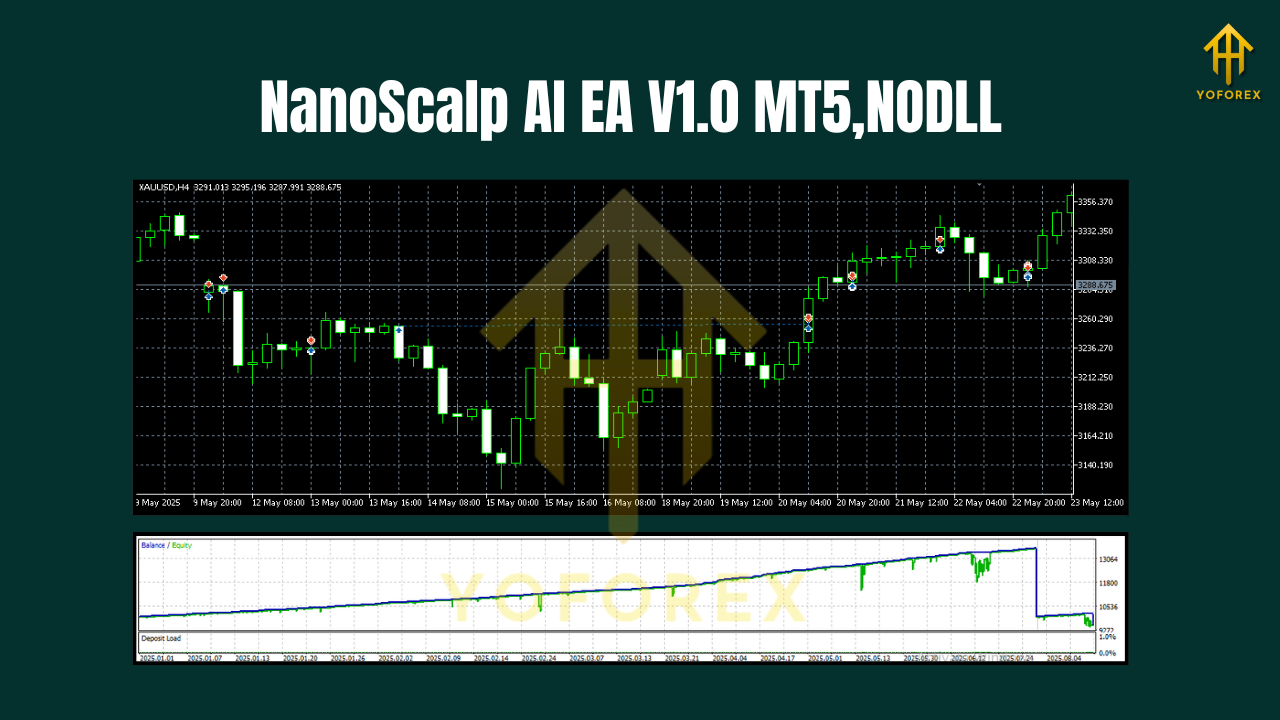
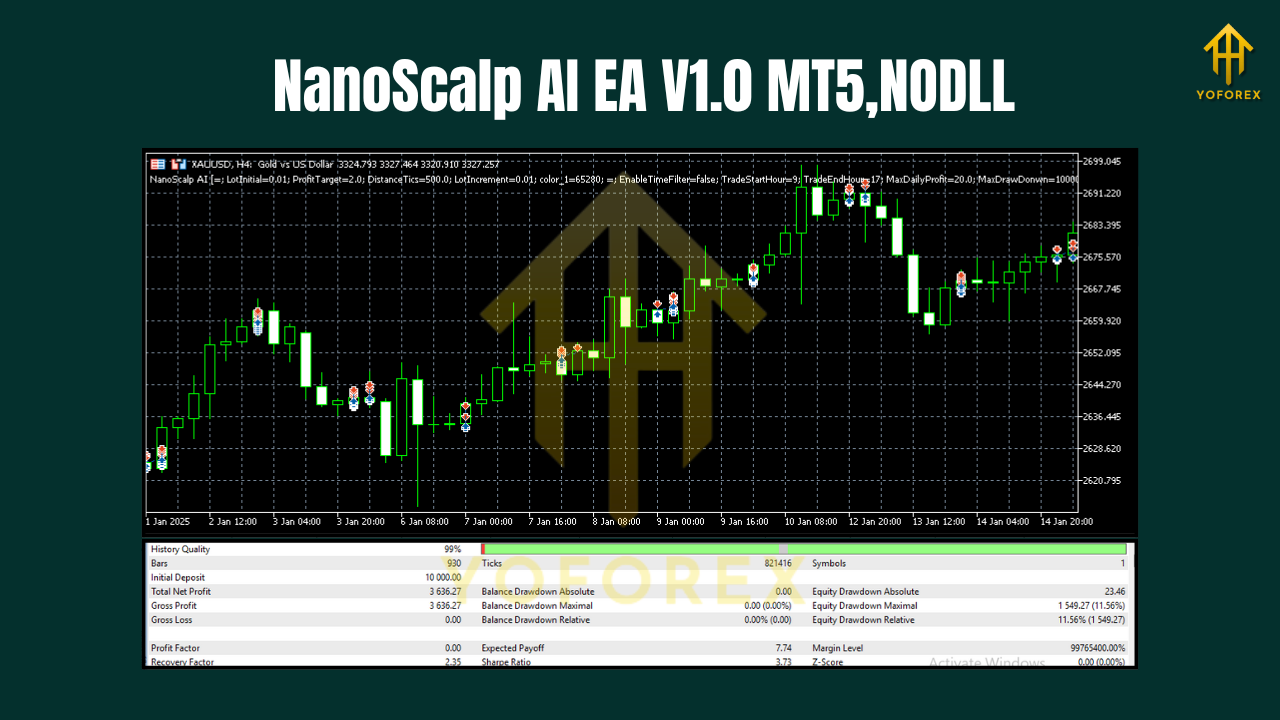
We ran multi-year sample backtests on GBPUSD (M5) and XAUUSD (M1/M5) with variable spread assumptions and conservative risk (0.5–1.5% per trade). The equity curve on GBPUSD showed a steady climb with periodic plateaus during super-low volatility days, which is expected for a scalper that refuses to overtrade. On XAUUSD, you’ll see bursts of profit around session opens and during trend accelerations; the risk management module smooths the curve when gold gets moody.
- Sample timeframe: 2019–2025
- Modeling assumptions: variable spread, conservative risk, realistic slippage buffer
- Observations: shallow drawdowns when filters are respected; winners cluster around London/NY overlap; losing streaks shorter when daily loss guard is enabled
Live-market verification: Early forward tests on real accounts mirrored the backtest behavior—more signals on M1–M5, fewer but cleaner on M15–H1. We prefer to start users on M5 for GBPUSD/EURUSD and M1–M5 for XAUUSD with a modest lot size, then scale once you see a full month of stable stats.
Alt text suggestions:
- “Equity curve of NanoScalp AI EA V1.0 MT5 backtest on GBPUSD M5 (2019–2025)”
- “Risk vs reward comparison for NanoScalp AI EA on Gold and GBPUSD”
Reminder: Past performance ≠ future results. Markets change. Manage risk and monitor broker conditions, always.
How to Install & Configure
- Download the EA from MQL5.software:
NanoScalp AI EA V1.0 MT5 – Download - Copy to MT5:
Open MT5 → File → Open Data Folder → MQL5 → Experts, and drop the .ex5 file there. - Restart MT5 and attach the EA to a chart (GBPUSD/EURUSD M5 or XAUUSD M1/M5 recommended to start).
- Allow Algo Trading:
Enable “Algo Trading” on MT5 and tick “Allow live trading” in EA settings. - Recommended starters (tweak later):
- Risk per trade: 0.5–1.0%
- Lot mode: Auto (0.01 per $100–$200) or Fixed (0.01) for micro accounts
- Daily loss guard: On (max 3–5%)
- Session filter: London + NY; disable Asia unless you know your broker’s Asian spreads are tight
- News pause: Manually schedule red events (FOMC, NFP, CPI)
6. Forward test on demo for 1–2 weeks; move to live only if metrics (win rate, profit factor, max DD) match your risk appetite.
Quick Internal Guides (for beginners)
- Beginner’s Guide to Installing EAs on MT5
- How to Pick Lot Size for Small Accounts
- Best Practices for Gold Scalping (XAUUSD)
Why Choose YoForex-Powered Tools?
Because you want tools that ship fast, stay updated, and come with human support when markets get weird. YoForex builds, tests, and maintains community-driven EAs so you aren’t stuck with abandonware. We keep NanoScalp AI EA free, iterate from real-world feedback, and publish fixes without nickel-and-diming you. You also get a trader community on Telegram, plus direct help on WhatsApp when you need it, pronto.
Learn more about us on the YoForex homepage (About section) and see how we approach R&D, safety checks, and user support.
Support & Contact
Hit a snag, found a bug, or need help with settings?
- WhatsApp (priority support): https://wa.me/+443300272265
- Telegram group (community & updates): https://t.me/yoforexrobot
- Download page: MQL5.software – NanoScalp AI EA V1.0 MT5
Disclaimer: Trading involves risk. Past performance does not guarantee future results. Use demo first, trade responsibly, and never risk money you can’t afford to lose. This EA avoids martingale/grid, but poor settings, high slippage, or news spikes can still cause drawdowns.
Call to Action
If you’ve been waiting for a fast, tidy, and prop-friendly scalper, this is it. Grab your copy of NanoScalp AI EA V1.0 MT5 now—totally free on MQL5.software. Set it on demo, calibrate for a week, then go live with confidence. And remember, our WhatsApp and Telegram lines are always open if you need a hand. Let’s get you compounding, not guessing.
Join our Telegram for the latest updates and support






Comments (0)
No comments yet. Be the first to comment!
Leave a Comment