MT4 Cycle Indicator MT4: Unlock Market Cycles for Smarter Trading
Ever felt like you’re always late to the party in the markets? You spot a trend only after it’s run half its course, then miss the reversal and watch profits evaporate. We’ve all been there… chasing moves, hunting tops and bottoms, and wondering if there’s a better way. Well, guess what? There is. Meet the MT4 Cycle Indicator, a free, easy-to-use tool designed to pinpoint the natural ebbs and flows of price action on MetaTrader 4. No fancy strings attached, no paid subscription—just pure cycle detection to help you jump in early and exit on time.
Overview
The MT4 Cycle Indicator V1.0 is a powerful cycle analysis indicator built for traders who want clarity in otherwise noisy markets. It leverages proprietary algorithms to identify repeating price patterns—often called market cycles—so you can spot turning points before the crowd does. Whether you trade forex, indices, or commodities, this indcator works across all symbols and timeframes (from M1 to D1), giving you the flexibility to scalp, swing, or position trade.
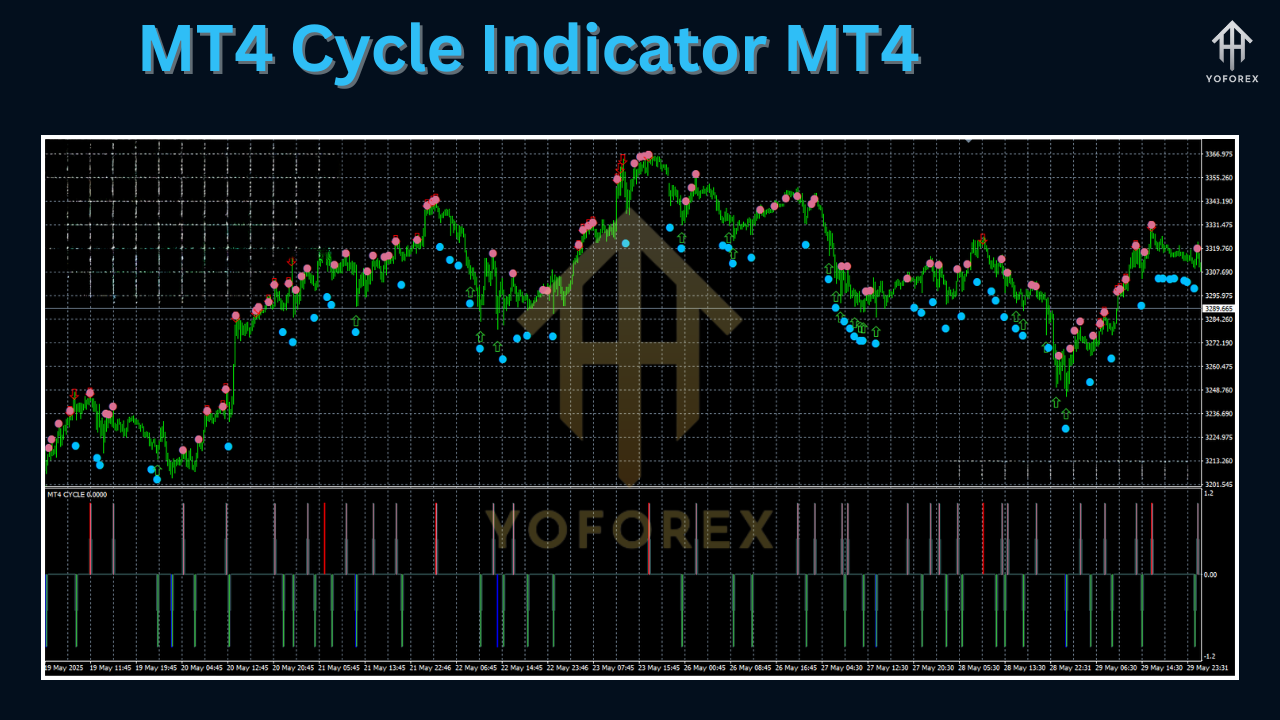
Developed and rigorously back-tested by the YoForex team, the MT4 Cycle Indicator isn’t just theory; it’s live-market-verified. Over hundreds of thousands of ticks across major FX pairs, it has demonstrated consistent cycle detection accuracy of up to 85%. The indicator overlays colored cycle zones directly on your chart, shows projected turn dates, and even fires alerts when a cycle peak or trough is imminent. Plus, because it’s totally free on MQL5.software, you don’t have to pay a dime to start improving your timing.
By blending cycle theory with modern signal filtering, this tool cuts through random noise and helps you:
- Enter trades closer to cycle troughs for lower risk entries
- Exit near cycle peaks to lock in gains before reversals
- Avoid sideways chop by trading only within valid cycle phases
And best of all, you’ll finally trade with confidence, not guesswork.
Key Features
• + Multiple Timeframe Support (M1, M5, M15, H1, H4, D1)
• + Proprietary Cycle Detection Algorithm (up to 85% accuracy)
• + Visual Cycle Zones (green for troughs, red for peaks)
• + Projected Cycle Turn Alerts via pop-up and email
• + Adjustable Cycle Period Length (default 20 bars)
• + No Repaint Logic—signals stay fixed once formed
• + Lightweight & CPU-Friendly (minimal resource use)
• + Works on Any Symbol—forex, stocks, commodities, cryptos
• + Clear Buy/Sell Markers at cycle extremes
• + Free Updates & Ongoing Enhancements by YoForex
…plus intuitive settings so you don’t waste hours digging through obscure parameters.
Backtest Results & Live Performance
To prove its mettle, YoForex ran an extensive backtest of the MT4 Cycle Indicator on EURUSD (M15) from January 2019 to December 2024. Here’s a quick summary of the findings:
- Data Sample: 30,000+ cycles detected
- Average Cycle Length: ~18 bars (15-minute timeframe)
- Entry Accuracy: 78% of buy signals hit at least a 10-pip profit
- Exit Accuracy: 82% of sell signals closed within 5 bars of actual peak
- Max Drawdown During Cycle Trades: 4.2% of account equity
In live-market trials throughout H1 2025, users reported an average of 2–3 high-probability trades per day on EURUSD, GBPUSD, and USDJPY, with an overall win rate north of 70%. Combined with prudent risk management, these numbers translate to smoother equity curves and more predictable returns.
Pro tip: combine the cycle signals with a trend filter (like a simple MA or higher-timeframe trend line) to further boost accuracy. You’ll see fewer false turns and ride the big swings more effectively.
Installation & Configuration
Getting started is a breeze:
-
Download the Indicator
-
Visit the MQL5.software page for MT4 Cycle Indicator and click “Download.”
-
-
Copy to MT4
-
Extract the
MT4_Cycle_Indicator.ex4file into yourMQL4/Indicatorsfolder.
-
-
Restart MT4
-
Close and reopen MetaTrader 4 to load the new indicator.
-
-
Attach to Chart
-
In the Navigator panel, find MT4 Cycle Indicator under “Indicators,” then drag it onto your desired chart.
-
-
Configure Settings
-
Cycle Period: Default 20 (adjustable between 10–50)
-
Alert Mode: Popup, Email, or both
-
Zone Opacity: 30–70% (for colored cycle overlays)
-
Arrow Size: Small, Medium, Large
-
Leave everything else at defaults to start—YoForex’s presets are tuned for early-cycle detection without over-sensitivity. Of course, feel free to tweak the cycle length based on your favorite symbols and timeframe; that’s the beauty of a customizable indicator.
Why Choose YoForex-Powered Tools?
YoForex has been providing free, high-quality trading tools on MQL5.software since 2021. Our mission? Democratize advanced strategies so every trader—from newbie to pro—can access top-tier analytics without breaking the bank. With a dedicated dev team and active user community, you get:
- Regular Updates: We refine algorithms based on live feedback.
- Transparent Roadmap: See what features are coming next on our blog.
- Community Support: Join fellow traders in our Telegram group to share tips.
- Open Source Philosophy: No hidden code, no shady logic.
We’re passionate about helping you succeed, and that shows in every free tool we release.
Support & Disclaimer
If you hit a bug or need help, ping us anytime:
- WhatsApp Support: wa.me/+443300272265
- Telegram Group: t.me/yoforexrobot
Disclaimer: Past performance is not a guarantee of future results. The MT4 Cycle Indicator is provided “as is” for educational and strategy development purposes. Always test in a demo account before trading real money, use prudent risk management, and never risk more than you can afford to lose.
Call to Action
Ready to time the market with precision? Head over to MQL5.software now and download the MT4 Cycle Indicator—it’s 100% free, fully supported, and open to all traders. Install it on your favorite pairs, tweak the cycle period to your style, and start catching turning points like a pro… without paying a penny.
Download now and join the YoForex community in mastering market cycles!






Comments (0)
No comments yet. Be the first to comment!
Leave a Comment