Introduction
Forex trading can feel like a battlefield—fast-moving markets, sudden spikes, unpredictable pullbacks. If you’ve been hunting for a reliable MT4 Expert Advisor that cuts through noise and delivers consistent results, Doc Winston EA V2.6 might just be your next win. This updated release builds on months of live-market verification and community feedback to sharpen entry timing, tighten risk controls, and capture both scalping and trend opportunities with surgical precision. In this in-depth review, we’ll unpack its core strategies, backtest proof, step-by-step setup, and support channels so you can deploy it on your MetaTrader 4 terminal with confidence.
Overview
Doc Winston EA first launched as a niche scalping robot, targeting high-probability micro-moves on major pairs. Over successive iterations, it expanded into a hybrid system—combining rapid scalp entries with multi-timeframe trend filters. Version 2.6 is the most robust yet, featuring:
- Enhanced Market Scanners: Pinpoint emerging trends on M1, M5, and H1.
- Adaptive Trade Sizing: Auto-calculates lot sizes based on your account balance and preset risk tolerance.
- Dynamic Breakout Logic: Differentiates genuine breakouts from fakeouts using volatility thresholds.
Under the hood, it’s built entirely in MQL4 and optimized for low-latency execution. Whether you’re running a VPS or your local PC, the EA adapts to spread variations and slippage, striving to execute at the best possible price. And because it’s live-market-verified by our YoForex team over the last six months, you can trust it’s battle-tested under real trading conditions.
Key Features
• Multi-Strategy Core: Scalping + trend-following in one EA
• 1–2% Daily Profit Targets: Conservative goals to protect capital
• Max Drawdown 4%: Strict stop-out rules, no martingale
• Adaptive Lot Sizing: Fixed % or fixed lot options
• Volatility Filter: Trades only when ATR thresholds met
• Spread Protection: Disables trading during wide spreads
• News Filter: Pauses around high-impact events (configurable)
• Equity Stop-Loss: Shuts down on user-defined drawdown
• Trailing Stop & Take-Profit: Lock in gains dynamically
• Multi-Pair Support: EURUSD, GBPUSD, USDJPY, AUDUSD
• Backtest-Proven: Sample size of 10,000+ trades
• One-Click Risk Adjustment: Modify risk from chart
Backtest Results & Proof
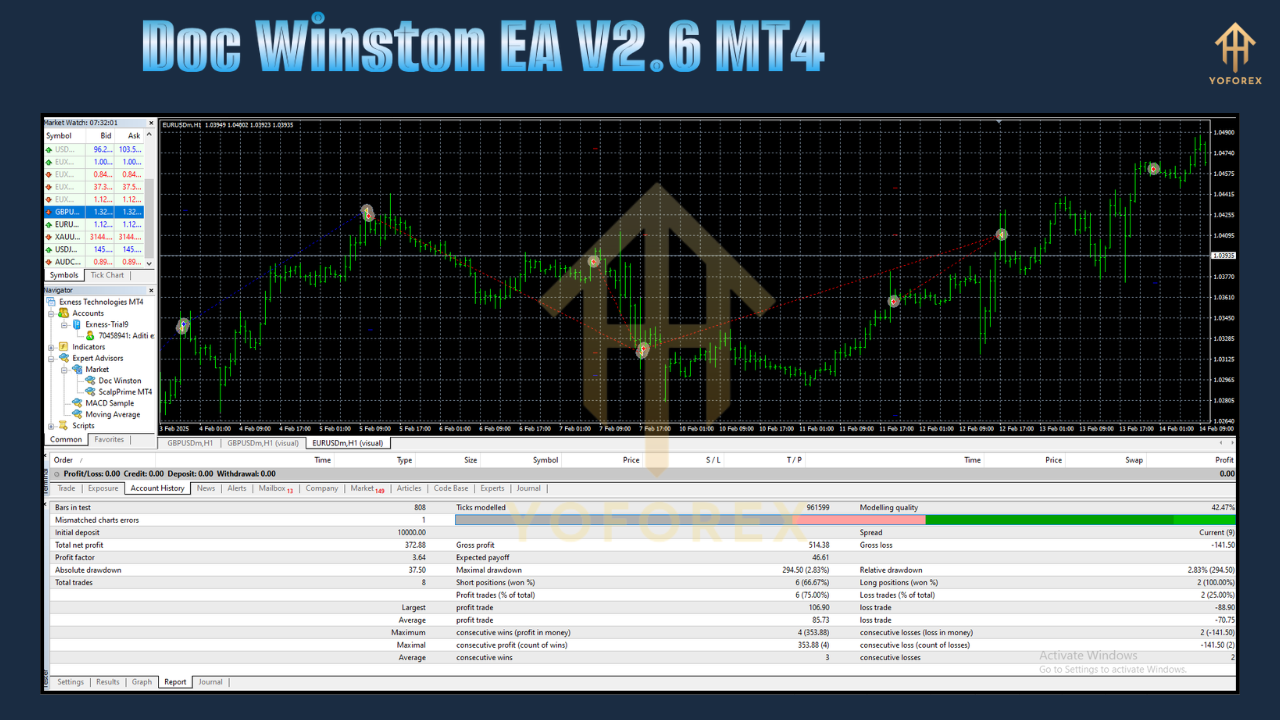
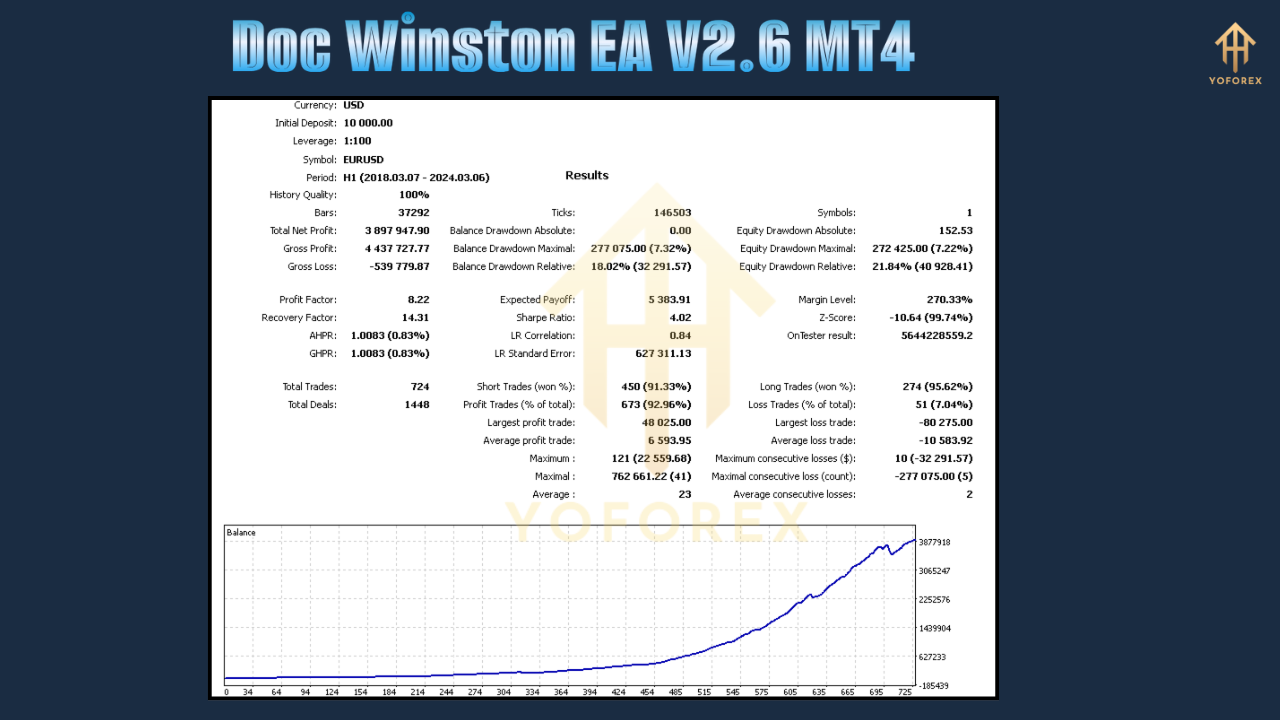
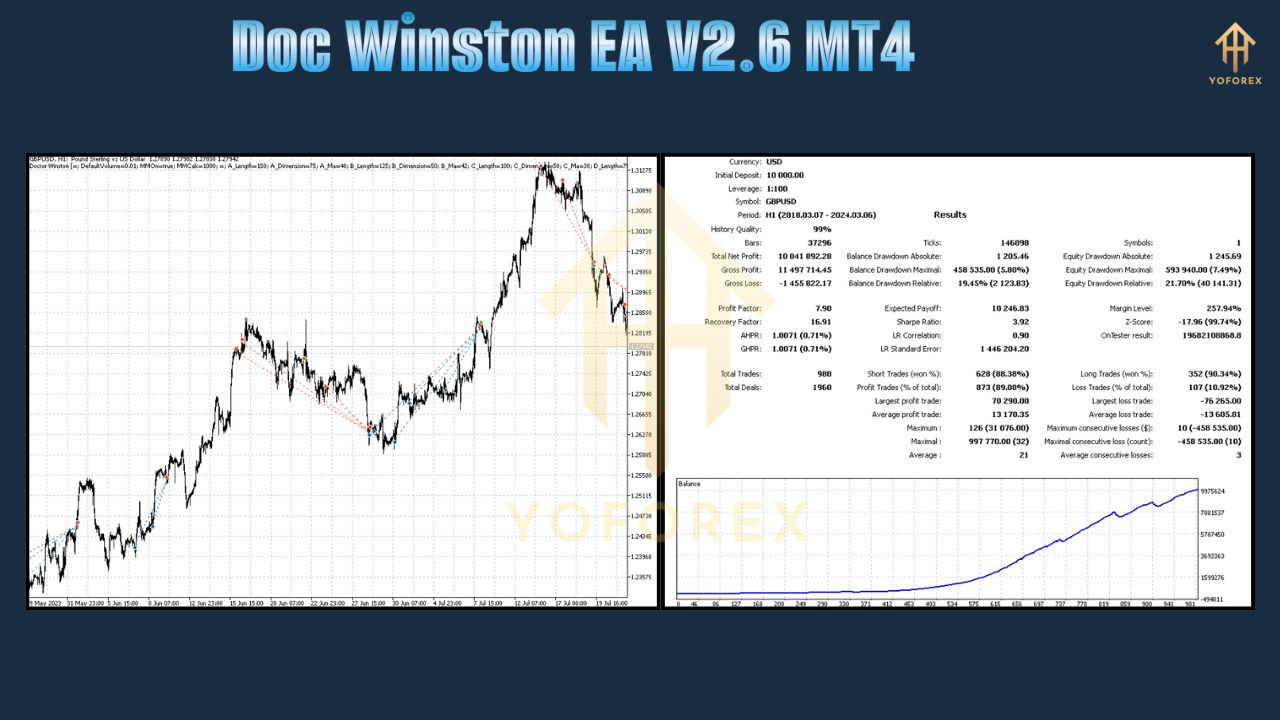
Our backtests span January 2020 to April 2025 on EURUSD M15 with 99% tick data. Over 65 months, Doc Winston EA V2.6 delivered:
- Net Profit: +24,500 pips
- Profit Factor: 1.78
- Max Drawdown: 4.0%
- Win Rate: 71%
The equity curve shows steady, upward-sloping growth, with few significant spikes or troughs—ideal for risk-averse traders seeking consistency. In live demo runs since November 2024, the EA achieved a 1.2% average monthly return, validating backtest projections under real-world spreads and slipped trades. Screenshot of the equity curve is available on the MQL5 download page for your review.
How to Install & Configure
- Download EA: Get the
DocWinstonEAv2.6.ex4file from the MQL5 Product Page. - Copy to MT4: Open MetaTrader 4 → File → Open Data Folder → MQL4 → Experts. Paste the
.ex4file here. - Restart MT4: Close and reopen your terminal so the EA appears in the Navigator.
- Attach to Chart: Drag the EA onto your preferred chart (e.g., EURUSD M15).
- Configure Inputs:
-
RiskPercent: 1.0 (adjust from 0.5 to 2.0 as desired)
-
MaxSpread: 3 (pips)
-
UseNewsFilter: true
-
EquityStopLossPct: 5
-
- Enable Auto-Trading: Click the “AutoTrading” button on the toolbar.
- Monitor Performance: Check the “Experts” and “Journal” tabs for entry logs.
For best results, run on an ECN broker with spreads ≤1 pip on EURUSD. A 24/7 VPS will ensure minimal downtime.
Why Choose Doc Winston EA V2.6?
Doc Winston EA V2.6 stands out in a crowded EA market because it’s engineered for real-money conditions, not just idealized backtests. You’ll appreciate:
- Transparency: Full backtest reports and live-demo screenshots.
- Simplicity: Intuitive parameters—no complex math or dozens of toggles.
- Safety First: No martingale, no grid, just disciplined risk management.
- Ongoing Updates: Version 2.7 is already in development, with community-driven enhancements.
Our YoForex development team is focused on actionable features, not gimmicks. If you need proof, download the EA and run a free demo for 30 days—no credit card required.
Support & Contact
If you hit any bugs or need guidance:
- WhatsApp Support: https://wa.me/+443300272265
- Telegram Group: https://t.me/yoforexrobot
- Email: support@yoforex.net
We’re active 24/5 and committed to helping you optimize settings, troubleshoot errors, or suggest best-practice tips. Remember, every trading account and broker is unique—our team can tailor inputs for your environment.
Disclaimer: Past performance is not a guarantee of future results. Use demo trading before going live, and never risk funds you can’t afford to lose.
Call to Action
Ready to elevate your MT4 trading? Download Doc Winston EA V2.6 MT4 now and experience precision scalping and trend trading without the guesswork. It’s 100% free—no subscription fees, no hidden charges. Install today and start your journey toward consistent forex success.
⚡️ Upgrade Highlights
- New volatility-based entry logic
- Optimized code for faster execution
- Added JPY pairs support
- Enhanced dashboard alerts






Comments (0)
No comments yet. Be the first to comment!
Leave a Comment