
Direcional System Indicator V1 MT4 – Complete Trading Guide
If you have ever felt confused while trying to read the market trend on MT4, you are not alone. Most traders struggle with identifying clean entries and exits simply because the charts look messy or the indicators lag too much. That’s exactly where the Direcional System Indicator V1 MT4 steps in. It is a simple, lightweight, and highly visual trend-direction tool created specifically for MetaTrader 4 traders who want to avoid emotional entries and instead rely on clear arrows, lines, and support-resistance dots.
This blog breaks down everything you need to know about Direcional System Indicator V1 MT4, how it works, how to use it properly, and why many traders consider it one of the easiest visual tools to understand trend structure. The indicator is totally suitable for beginners, scalpers, intraday traders, and even swing traders who prefer clean confirmations before entering the market.
Let’s dive in and unpack how this tool simplifies the way you read trends, spot reversals, and manage trades more confidently.
What is Direcional System Indicator V1 MT4?
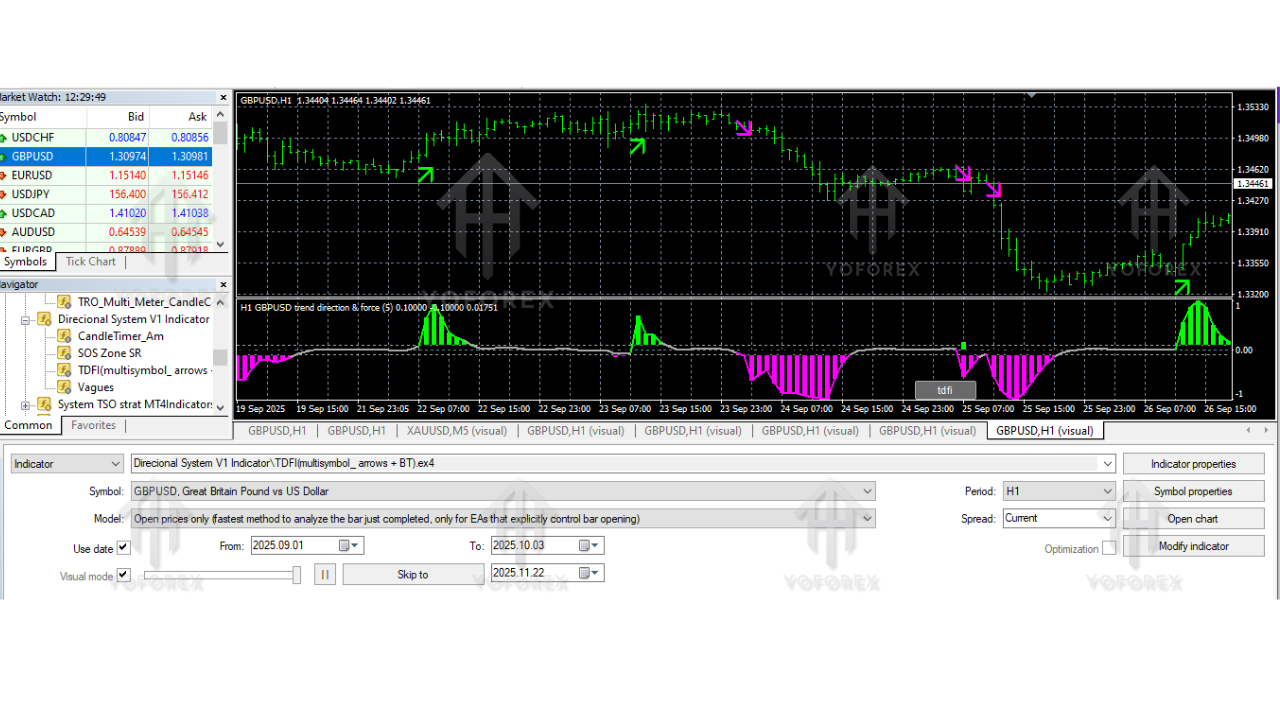
Direcional System Indicator V1 MT4 is a trend-direction tool designed to show the market bias using arrows, clean lines, and dynamic dots. The main idea is to remove the guesswork from trend identification. Instead of waiting for confusing crossovers or repainting zone-based indicators, it simply prints a bold arrow when the trend is strong enough and clearly established.
The arrows represent trend direction. The lines represent the ongoing momentum as the trend continues. And the dots act like dynamic support and resistance points, which can be used for stop-loss placement, breakout trading, or monitoring potential reversal levels.
Unlike typical repainting indicators, Direcional System Indicator V1 stays stable once a signal is printed. This makes it more reliable for live trading, especially during volatile market conditions. It’s also extremely lightweight, so it doesn’t slow down the MT4 platform even if you use it across multiple chart windows at once.
How the Indicator Works
There are three primary components you will see when running Direcional System Indicator V1 MT4:
1. Trend Arrows
These arrows appear whenever a strong trend begins.
- Buy Arrow: Indicates a bullish trend.
- Sell Arrow: Indicates a bearish trend.
The arrows print only after strong trend confirmation, reducing the chances of false entries.
2. Trend Lines
As the trend continues, directional lines start forming.
These lines act like a visual path of the current momentum.
- Longer lines indicate trend strength.
- Shorter lines suggest consolidation or weakening movement.
This helps traders decide whether to hold trades longer or exit early.
3. Support & Resistance Dots
The indicator also prints dots along the market flow. These dots can be used as:
- Support levels during uptrends
- Resistance levels during downtrends
- Stop-loss placements
- Confirmation points for bounces or breakouts
Because these dots dynamically adjust with the trend, they work better than static horizontal levels drawn manually.
Why Traders Love Direcional System Indicator V1 MT4
Many MT4 indicators feel complicated, cluttered, or simply unreliable. Direcional System Indicator V1 focuses on clarity and consistency, which makes it popular among new and advanced traders. Some of the common reasons traders rely on it include:
- No repainting signals after candle close
- Easy to read even on smaller timeframes
- Works for forex, indices, gold, crypto, and synthetic indices
- Helps remove emotional decision-making
- Ideal for trend continuation and reversal confirmation
- Great for backtesting and quick strategy building
Even though it looks simple on the chart, the underlying logic of combining directional arrows, momentum lines, and support-resistance dots gives traders a complete analytical picture without using multiple indicators.
Best Timeframes and Market Conditions
Direcional System Indicator V1 MT4 works well on:
- M5
- M15
- M30
- H1
- H4
For scalpers, M5–M15 works best.
For intraday traders, M30–H1 is ideal.
For swing traders, H1–H4 provides clear structure without noise.
It performs strongly during trending markets, especially after major news events, session openings, or during high-liquidity hours. During ranging markets, the dots help traders avoid fake breakouts and bad entries.
How to Use Direcional System Indicator V1 MT4 for Trading
Below is a simple step-by-step approach to using it effectively:
1. Look for the Arrow
The first confirmation always starts with a trend arrow.
- Buy arrow = start watching for long opportunities
- Sell arrow = start watching for short opportunities
2. Confirm with the Trend Lines
If the trend lines are stretching smoothly in the arrow direction, it indicates strength.
Avoid taking trades when the lines are too short or flat.
3. Use the Dots as Entry or Stop-Loss Markers
Support dots appear under price (bullish).
Resistance dots appear above price (bearish).
You can use them to define:
- Entry zones
- Stop-loss placement
- Breakout confirmations
4. Exit Trades When Dots Flip or Trend Lines Fade
If the support dots shift above price or resistance dots shift below price, it indicates a possible reversal.
5. Avoid Trading Against the Arrows
The indicator is designed to help you stay with the trend, not fight it.

Advantages of Direcional System Indicator V1 MT4
- Clean, clutter-free charting
- Highly beginner-friendly
- No repainting after candle close
- Dynamic support and resistance
- Quick reaction to strong trend shifts
- Suitable for scalping, day trading, and swing trading
- Can be used with additional indicators such as RSI, MACD, or moving averages
Does the Indicator Repaint?
No, once the candle closes and the arrow is printed, it does not repaint.
This is important because repainting indicators create misleading signals that cannot be used for trading. Direcional System Indicator V1 solves this problem.
Installation Guide
- Download the indicator file (MQ4 or EX4).
- Open MT4.
- Click File → Open Data Folder.
- Navigate to MQL4 → Indicators.
- Paste the file inside the Indicators folder.
- Restart MT4.
- Drag the indicator onto any chart from the Navigator panel.
The tool will display arrows, lines, and dots automatically without any complicated setup.
Trading Tips for Best Results
- Use the indicator with market structure analysis.
- Avoid trading major news releases.
- Combine with risk-reward ratios like 1:2 or 1:3.
- Avoid trading when the market is flat or consolidating too tightly.
- Practice first on a demo account.
The goal is to improve consistency, not chase every move.
Conclusion
Direcional System Indicator V1 MT4 is one of those simple yet effective tools that make trading much easier for beginners and experienced traders alike. With its clear directional arrows, smooth trend lines, and dynamic support-resistance dots, you get a full picture of the trend movement without having to stack multiple indicators. If you want a cleaner, more confident trading experience, this indicator can become a solid part of your daily strategy.






Comments (0)
No comments yet. Be the first to comment!
Leave a Comment