
Cherma EA V1.1 MT4 – High-Frequency Scalping for Gold & Majors
If you’ve been hunting for a fast, disciplined scalper that actually respects risk while still squeezing pips from intraday volatility, Cherma EA V1.1 MT4 deserves a serious look. Built for XAUUSD (Gold), EURUSD, and GBPUSD, it’s designed to thrive on M30, M5, and H4 timeframes—so you can align it with your style, whether you’re a quick-in/quick-out trader or a structured swing scalper. There’s also a Cherma MT5 version for traders who prefer MetaTrader 5; the logic and workflow are essentially the same, so you won’t feel lost switching platforms.
Below, I’ll break down what Cherma does under the hood (in plain English), which settings matter most, and how to deploy it step-by-step. I’ll also share practical tips to keep drawdowns sane and your execution clean, coz consistency > hype.
What Is Cherma EA V1.1 MT4?
Cherma EA is a high-frequency scalping Expert Advisor that scans short-term market imbalances and momentum sparks on XAUUSD, EURUSD, and GBPUSD. It’s engineered to identify micro-trends and mean-reversion pockets, then execute tight trades with controlled stop loss and dynamic take profit logic. The M5 mode is the “fast lane,” M30 is a balanced swing-scalp mix, and H4 leans more toward momentum waves with fewer—but usually more meaningful—signals.
Highlights at a glance:
- Platforms: MetaTrader 4 (V1.1); also available for MT5
- Pairs: XAUUSD, EURUSD, GBPUSD
- Timeframes: M5, M30, H4
- Style: High-frequency scalping with risk delegation to lot-sizing and adaptive exits
- Execution: Broker-agnostic logic; low-spread accounts recommended
How Cherma EA Works (Without the Jargon)
Cherma combines short-range momentum filters with volatility gating. In simple terms, it waits for the market to move “enough” but not too chaotically, then looks for price structures where risk-to-reward is favorable. Think of it like a disciplined scout: quick to act in clean lanes, cautious in turbulence. On M5, it’ll look for impulse bursts and pullbacks; on M30 and H4, it respects broader structure and avoids over-trading.
A few design principles drive the behavior:
- Selective entry logic to reduce “random” scalps
- Tight, pre-defined risk with optional ATR-based stops
- Adaptive take profit that scales with current volatility
- Spread & slippage checks to avoid bad fills during spikes
The result is an EA that can take plenty of trades when conditions are right, but won’t spam your account in chop (at least not recklessly).
Key Features You’ll Actually Use
- • High-frequency scalping core tuned for M5, with balanced modes for M30 & H4
- • Multi-pair coverage: XAUUSD (Gold), EURUSD, GBPUSD
- • Volatility-aware entries that avoid low-energy noise and extreme spikes
- • Smart exits: dynamic TP/SL with optional breakeven logic
- • News-avoidance window (optional) to pause around major events
- • Risk-per-trade control (percent or fixed-lot) to cap downside
- • Spread filter to skip trades when spreads widen
- • Trade frequency limiter so you don’t over-expose in fast markets
- • Magic Number isolation for multi-chart/multi-pair deployments
- • Broker-agnostic design; works best with low-spread, fast-execution brokers
- • MT4-first build with an MT5 twin for those who prefer the newer terminal
- • Clean logs & alerts so you understand what it’s doing and why
Recommended Setups by Pair & Timeframe
XAUUSD (Gold)
- Timeframe: M5 if you want action; H4 if you want calmer entries
- Notes: Use a conservative risk % on M5—gold moves fast. Consider enabling the spread filter and slightly wider ATR-based stops.
EURUSD
- Timeframe: M5 and M30 both work well
- Notes: Tight spreads help. You can be a tad more assertive with lot sizing versus gold (but don’t go wild).
GBPUSD
- Timeframe: M30 is the sweet spot; H4 for more measured trades
- Notes: GBPUSD can “jump.” Keep slippage controls on and consider a modest trade frequency cap.
Pro Tip: Start with risk per trade = 0.5%–1% until you’re familiar with live behavior. Scale only after you’ve seen at least a few weeks of data on your broker/VPS combo.
Risk & Money Management
No EA—no matter how smart—can outrun poor risk rules. Cherma gives you the dials, but you still need to set them sensibly:
- Fixed vs. % Risk: If your lot sizing skills are still growing, use % risk—it auto-adjusts as equity changes.
- Daily Loss Cap: Consider a “kill switch” day-loss limit (e.g., 3%—tune to your tolerance).
- Trade Frequency: Use the built-in limiter if you’re tempted to run multiple pairs/timeframes on one small account.
- Prop-friendly rules: If you trade prop challenges, align max daily loss and max trailing draw with their rules before going live.
Backtesting & Forward Expectations
While backtests aren’t reality, they’re still useful to gauge how logic behaves across regimes. For Cherma:
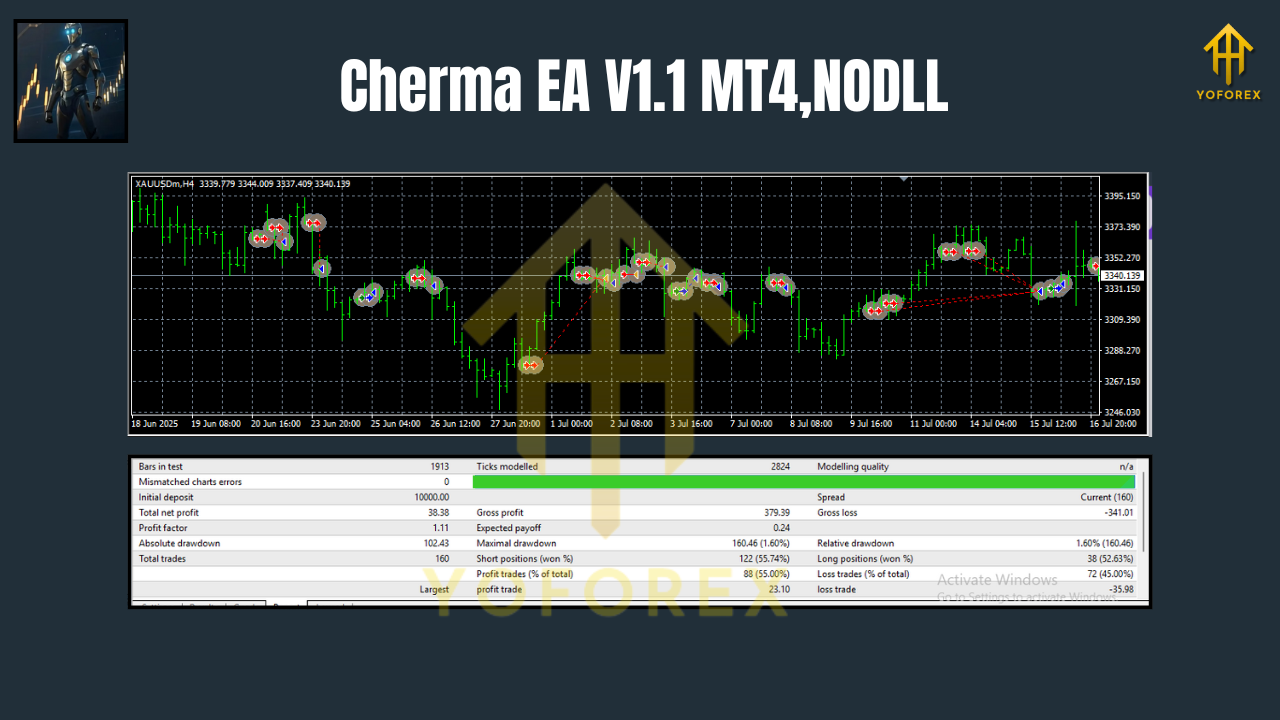
- M5 on XAUUSD generally shows many short-duration trades with a mix of impulse entries and quick exits. Expect clusters of trades during active sessions and fewer overnight.
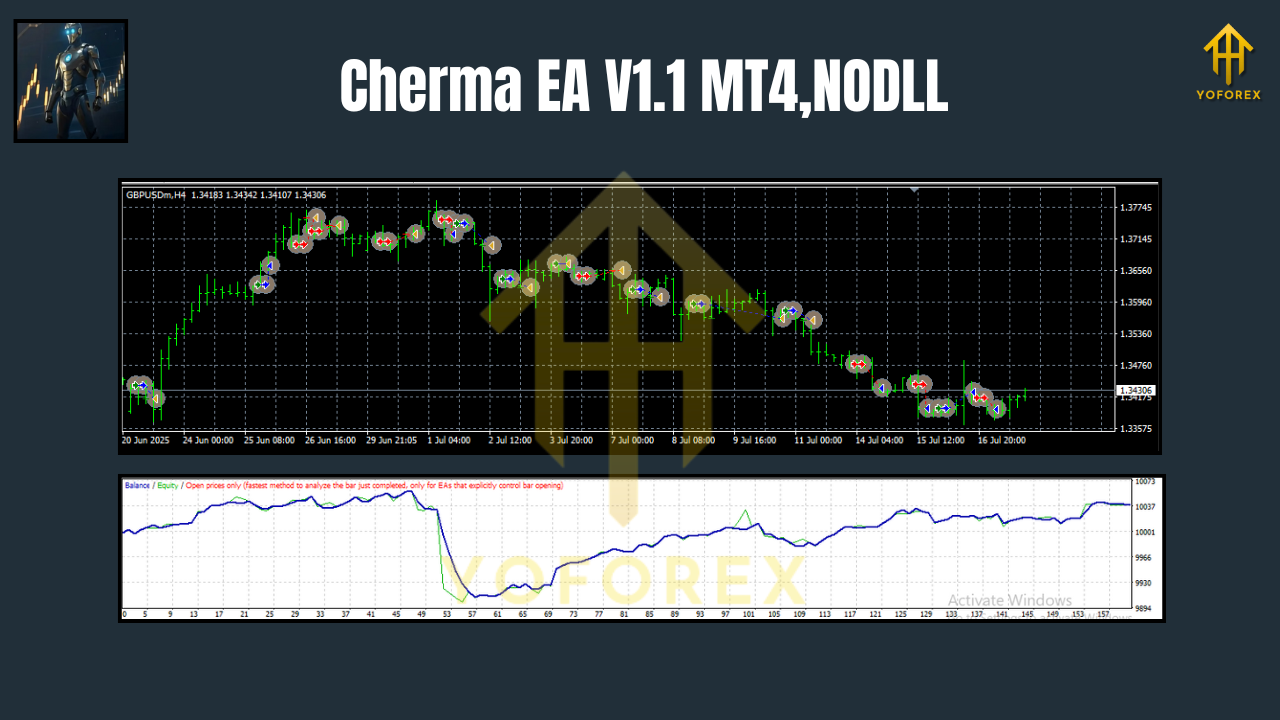
- M30 on EURUSD/GBPUSD tends to reduce noise and drawdowns, with fewer but cleaner sequences.
- H4 trades are sparser but can capture meaningful swings; drawdown per trade may look larger in pips, but percent risk is what matters.
Forward behavior will depend on spreads, execution speed, slippage, and your VPS. If your broker widens spreads at session changes or news, you’ll see more skipped trades—this is good, not bad. It’s the EA protecting you from poor conditions.
How to Install & Launch (MT4)
- Download & Copy
- Place the Cherma EA V1.1 file into:
File → Open Data Folder → MQL4 → Experts
2. Restart MT4
- Close and open MT4 so it compiles/loads correctly.
3. Attach to Charts
- Open charts for XAUUSD, EURUSD, GBPUSD on M5/M30/H4, then drag the EA onto each chart you intend to trade.
4. Allow Live Trading
- Check “Allow live trading” and “Allow DLL imports” if required by the EA.
5. Set Risk & Filters
- Choose your lot sizing (fixed or %), spread limit, slippage, and news window (optional).
6. Run on VPS
- Keep MT4 open 24/5. A low-latency VPS reduces slippage and missed ticks.
Quick QA pass: Once attached, confirm the smiley face is active, the spread is within your limit, and Experts/Journal logs show no errors.
Optimization Tips
- Walk-Forward > Single Period: If you optimize, test multiple out-of-sample windows to avoid curve-fitting.
- Session Filters: Consider disabling trading during dead liquidity periods for your broker.
- One Change at a Time: When tuning, adjust a single parameter and forward-test for a few days before changing anything else.
Who Should Use Cherma?
- Scalpers who like M5 speed but want rules that throttle low-quality signals.
- Balanced intraday traders who appreciate M30 structure.
- Swing-leaning scalpers who want the patience of H4 with automated discipline.
- Prop traders who need tight risk control and predictable behavior.
If you prefer ultra-long-term trend trading, Cherma can still help on H4—but it’s happiest when markets are actually moving.
Common Questions (Fast Answers)
Does it use martingale or grid?
No. Risk is capped per trade; you choose fixed or %.
Will it work on other pairs?
The logic is tuned for XAUUSD, EURUSD, GBPUSD. You can experiment, but stick to majors with low spreads.
MT5 version available?
Yes, Cherma MT5 mirrors the MT4 logic for those terminals. Settings are similar.
Minimum balance?
Depends on your risk per trade and broker. Start small, keep risk tiny, and only scale after stable forward results.
Final Take
Cherma EA V1.1 MT4 is a purpose-built scalper with enough guardrails to keep you out of the worst market pockets, while still catching the micro-moves that make scalping worthwhile. Use M5 for action, M30/H4 for composure, keep risk modest, and let the strategy do its thing. There’s no magic here—just well-designed logic that rewards discipline. If you want an EA that actually respects your capital and doesn’t need babysitting every minute, this one’s a solid pick.






Comments (0)
No comments yet. Be the first to comment!
Leave a Comment