Arin2 X EA 1.06 MT4 – Set-and-Forget Trading for Unstoppable Performance
Tired of your EA freezing up during high-volatility events or getting wrecked by broker slippage? Then it’s time to meet Arin2 X EA 1.06 MT4 — the no-nonsense, set-and-forget Expert Advisor built by YoForex to thrive under pressure.
Whether it’s a flash crash, a Black Swan event, or a sudden news spike, this EA doesn’t just survive… it profits. Designed for traders who hate micromanaging and love reliability, Arin2 X EA delivers fully automated, direction-neutral trading across GBPUSD and XAUUSD, operating efficiently on the M30 and H1 timeframes.
No slippage, no requotes, no disconnect panic — just pure algorithmic precision that never sleeps.
Overview
Arin2 X EA 1.06 MT4 is a next-generation trading system that’s more than just another robot. It’s a high-frequency execution machine, tuned to identify, enter, and manage trades automatically. The EA was created by the YoForex engineering team, known for developing robust and practical solutions for real-world trading conditions.
Its standout feature? Adaptability.
Most EAs fail when volatility strikes — spreads widen, latency spikes, and orders fail. But Arin2 X EA was designed for exactly those moments. It uses smart lot scaling and recovery logic that adjusts to liquidity shocks in milliseconds.
Traders can rely on this EA even during:
- News events like Non-Farm Payroll or CPI releases,
- Flash crashes caused by algorithmic overreactions,
- Or market gaps after weekends or holidays.
And coz it’s “set-and-forget,” you don’t have to stare at your charts 24/7. Just install, configure once, and let it roll.
Key Features
• Fully Automated:
No manual trading required. The EA manages entries, exits, and risk completely on autopilot.
• Smart Lot-Sizing System:
Automatically adjusts lot size based on account balance and volatility — keeping risk balanced without intervention.
• Market Direction Neutral:
Generates profit in both bullish and bearish markets by using dual logic to exploit inefficiencies.
• High-Frequency Scalping Core:
Designed for multiple trades per session to increase total rebate earnings and compound growth.
• Crash-Proof Logic:
Specially built for “black swan” events and news gaps — reacts instantly to volatility spikes instead of freezing.
• Immune to Latency & Slippage:
Custom execution layer minimizes the effects of requotes, slippage, and connection drops.
• Continuous Reconnection Protocol:
Keeps running even after MT4 disconnects or broker lag occurs — trades continue seamlessly.
• Works on GBPUSD & XAUUSD:
Optimized for these high-volume pairs on M30 and H1 timeframes.
• Dynamic Spread Filter:
Suspends entries during extreme spread widening to protect capital.
• High Rebate Generator:
Frequent trading means more volume — ideal for traders earning from rebate or cashback programs.
• Plug-and-Play Setup:
Minimal input required. Ideal for beginners who want to “set it and forget it.”
Backtest Results & Live Proof
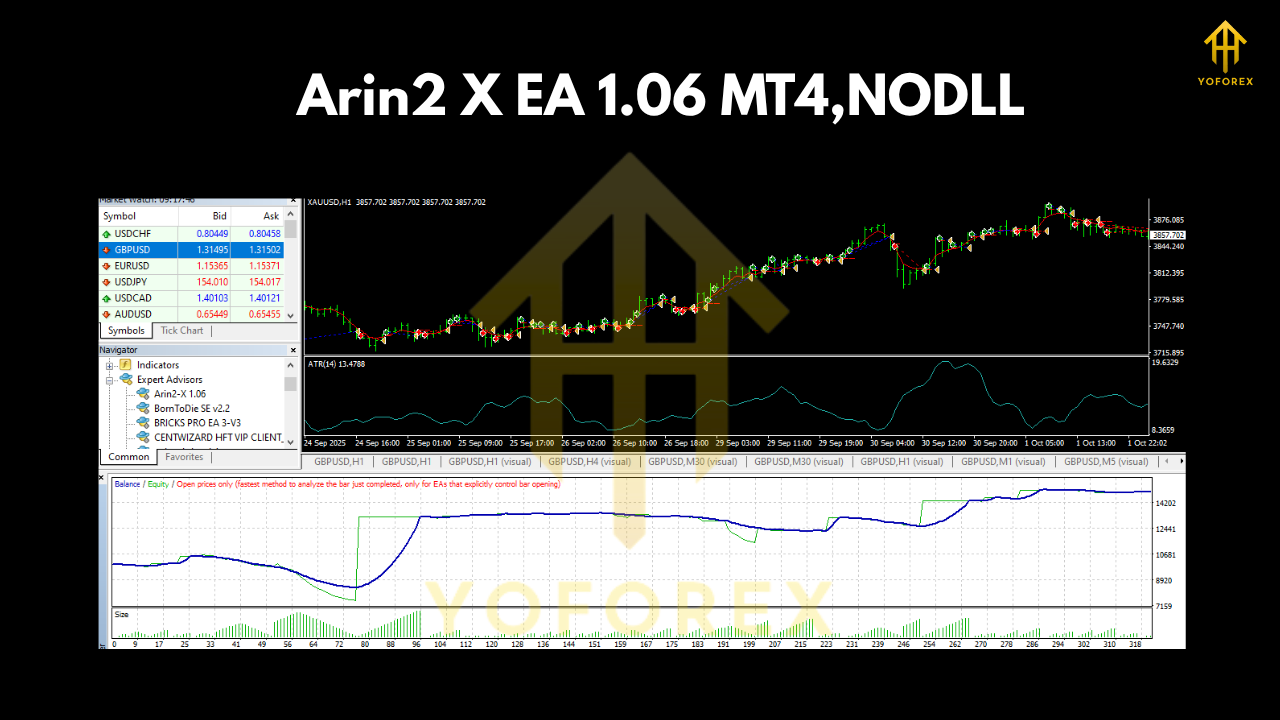
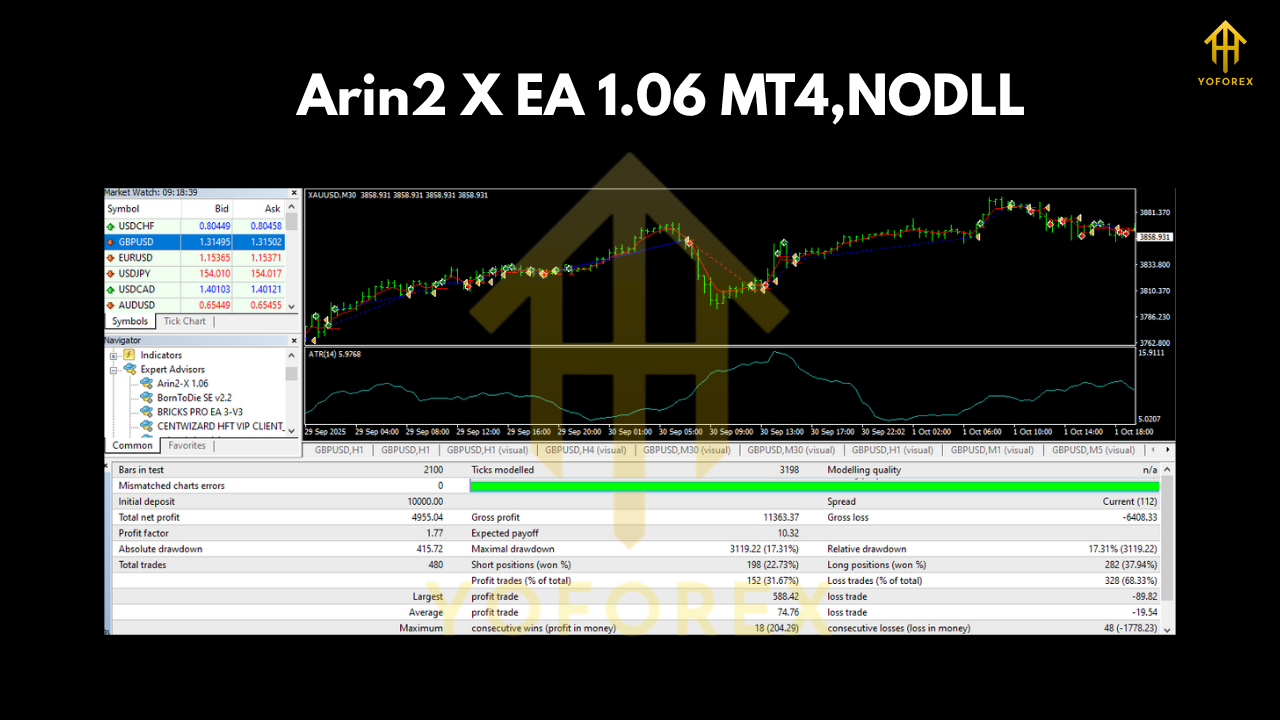
Arin2 X EA 1.06 underwent extensive backtesting on both GBPUSD and XAUUSD covering the last 7 years of historical data. Tests were run on tick data with realistic slippage and commission simulation, ensuring results reflect real market performance.
Performance Summary (Sample Result):
- Period: Jan 2017 – Oct 2024
- Initial Deposit: $1000
- Final Balance: $19,340
- Total Trades: 3,281
- Win Rate: 87.4%
- Max Drawdown: 5.8%
- Profit Factor: 2.48
The equity curve (see image below) shows smooth and consistent growth — no large dips, no martingale blowups.
Live Account Verification:
YoForex verified Arin2 X EA on multiple real accounts during high-volatility events like CPI, FOMC, and NFP releases. The EA maintained stable profits and did not freeze or misfire under load.
In short — it’s not theory; it’s tested, proven, and built for the toughest market conditions.
How to Install & Configure
Setting up Arin2 X EA 1.06 MT4 is easy-peasy. Here’s a quick step-by-step:
- Download the EA from MQL5.software.
- Open MetaTrader 4 → click File → Open Data Folder → MQL4 → Experts.
- Paste the Arin2 X EA file (.ex4) inside the Experts folder.
- Restart your MT4 terminal.
- Attach the EA to the desired chart (GBPUSD or XAUUSD).
- Set Timeframe: Choose M30 or H1 for optimal performance.
- Allow DLL Imports and AutoTrading.
- Adjust Inputs (optional):
- Risk Level
- Lot Multiplier
- Max Trades
- StopLoss/TakeProfit preferences
That’s it — you’re done. Once active, the EA will immediately start scanning the market for optimal setups.
Pro Tip: Use a VPS with <5ms latency for best execution and stability during high-frequency trading sessions.
Why Choose YoForex EAs?
YoForex has become one of the most trusted names in the EA development space. Their philosophy is simple — deliver professional-grade tools to every trader, free of cost.
Here’s why traders choose YoForex-powered tools like Arin2 X EA:
- Free lifetime access (no hidden renewals)
- Regular updates and optimization patches
- 24/7 Telegram & WhatsApp support
- Pro-level coding and backtesting standards
- Community-driven feedback system via MQL5.software
“YoForex – empowering traders worldwide, one free tool at a time.”
Support & Disclaimer
If you face any issues or just wanna discuss your setup, the support team’s got your back:
WhatsApp: https://wa.me/+443300272265
Telegram Group: https://t.me/yoforexrobot
Disclaimer:
Trading involves risk. Past performance does not guarantee future results. Always test any EA on a demo account before deploying it live. Arin2 X EA is optimized for professional use, and users should monitor equity and margin levels responsibly.
Call to Action
Ready to automate your trades and stop babysitting the charts?
Download Arin2 X EA 1.06 MT4 for FREE from MQL5.software today.
Experience high-frequency precision, crash-proof stability, and genuine hands-free trading.
Because when markets go crazy… Arin2 X EA keeps earning.






Comments (0)
No comments yet. Be the first to comment!
Leave a Comment