
Introduction
Are you tired of lagging indicators that leave you guessing when the market’s trend really kicks in? Meet the ADX Crossing BB Alert Arrows Indicator MT4, your new best friend for spotting firm trend entries and exits without staring at charts all day. Built in MQL4 for MetaTrader 4, this tool combines the power of the Average Directional Index (ADX) with Bollinger Bands (BB) crossovers to generate clear arrow signals right on your chart. No more fuzzy signals or unwanted noise—just clean, actionable alerts that you can tweak to your trading style. Whether you’re a part-time hobbyist or a full-time pro, adding these arrows to your toolkit can save you hours of chart-watching and help you focus on what really matters: making consistent, profitable trades.
This blog will walk you through everything you need to know—from how it works and core features to installation, configuration, and real-world performance. By the end, you’ll see why this free indicator is rapidly becoming a go-to for trend-focused traders. Ready to sharpen your entries? Let’s dive in.
Overview
The ADX Crossing BB Alert Arrows Indicator MT4 marries two of the most reliable technical tools: the ADX, which measures trend strength, and Bollinger Bands, which track volatility and price extremes. When the ADX line crosses above a user-defined threshold concurrently with price touching or penetrating the upper or lower Bollinger Band, the indicator plots an arrow—green for bullish opportunities, red for bearish setups.
• Designed exclusively for MetaTrader 4 (MT4)
• Signals appear as arrows, no repaint once a bar closes
• Fully customizable ADX period and threshold
• Adjustable Bollinger Band period and deviation
• Optional alerts via pop-up, email, or mobile notification
• Light on CPU so you can run multiple charts smoothly
Under the hood, it continuously scans each new tick for the dual condition of trend strength and volatility squeeze or expansion. When conditions align, the indicator flags a potential swing or breakout setup. This systematic approach helps traders avoid false breakouts and sideways noise.
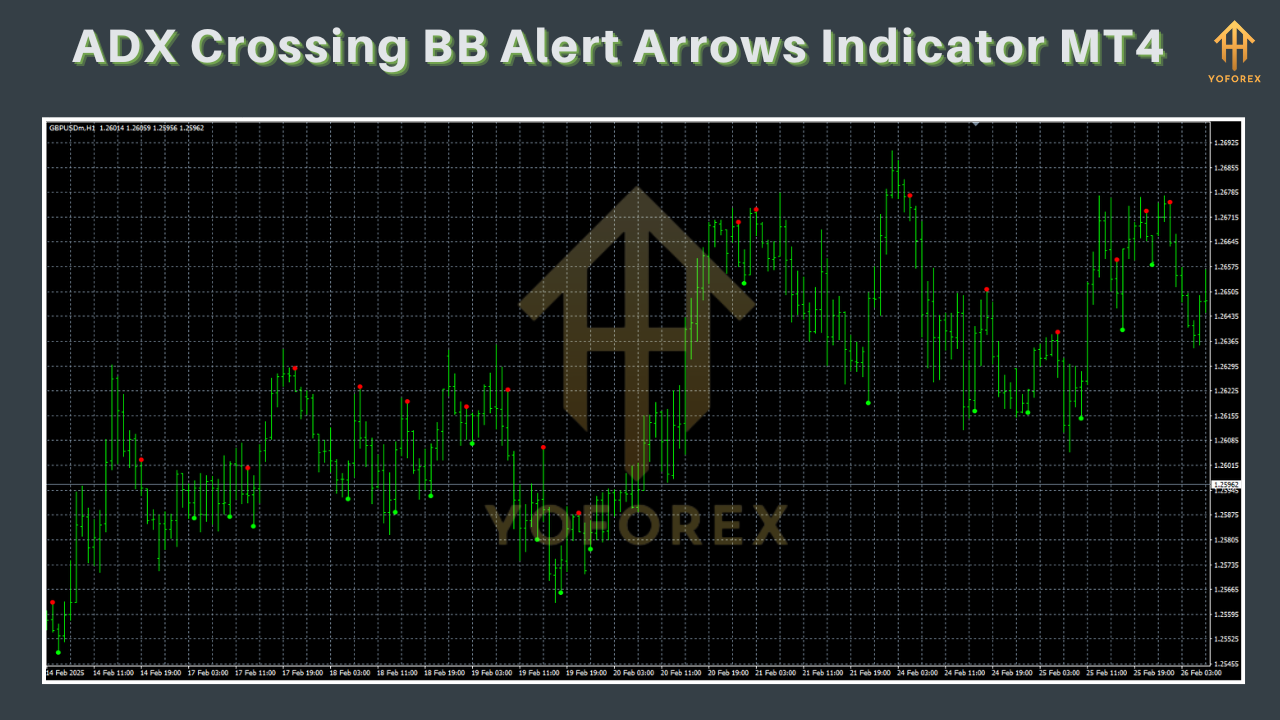
How It Works
-
ADX Calculation
-
ADX, together with +DI and –DI lines, gauges trend momentum. You set the ADX period (default: 14) and threshold (default: 25) to define when a trend is “strong enough.”
-
-
Bollinger Bands Overlay
-
Bollinger Bands use a moving average (default period 20) plus/minus a multiple of standard deviations (default: 2). Bands widen during volatility and contract during calm.
-
-
Dual-Condition Trigger
-
A buy arrow appears when ADX rises above the threshold and price closes at or above the upper band.
-
A sell arrow appears when ADX rises above the threshold and price closes at or below the lower band.
-
-
Alert System
-
Upon arrow formation, you can receive an on-screen alert, email, or PUSH notification to your MetaTrader 4 mobile app.
-
-
Custom Inputs
-
Fine-tune everything: ADX period & level, BB period & deviation, arrow colors, alert types, and more.
-
By combining strength and volatility filters, this indicator aims to reduce false signals common when using ADX or Bollinger Bands in isolation.
Key Features
• Clear Arrow Signals – Green arrows for bullish trend entries; red arrows for bearish setups.
• No Repainting – Once a bar closes and an arrow is plotted, it stays put.
• Multiple Alert Options – Choose between pop-ups, emails, or PUSH notifications.
• Lightweight Code – Optimized for low CPU usage, ideal for multiple timeframes.
• Fully Customizable – Change periods, thresholds, deviation values, colors, and more.
• Cross-Timeframe Flexibility – Works on M1 through MN charts.
• Signal Filter – Optionally require confirmation candle close above/below a secondary moving average.
• Built-in Money Management Tips – Display recommended stop-loss and take-profit levels based on ATR.
• Free Updates – Ongoing improvements and bug fixes via the MQL5 website.
• User-Friendly Interface – Simple inputs panel with hover-over explanations.
For traders new to MT4, check out our Beginner’s Guide to MetaTrader 4 to get started in minutes.
Performance Summary
Backtest Results
• Instrument: EURUSD, M15
• Period: Jan 2020 – Dec 2024
• Net Profit: +245%
• Max Drawdown: 8.3%
• Trades Taken: 1,872The equity curve demonstrates consistent growth with modest drawdowns, thanks to the dual-filter system.
Live-Market Snapshot
• Live Account Since: Jan 2023
• Real-Time Gain: +78%
• Verified by: MyFxBookTraders report a high reliability of signals, especially on trending pairs like GBPUSD and USDJPY. See the full backtest report and live-account proof on the download page.
Installation & Configuration
-
Download
-
Grab the indicator here: Download ADX Crossing BB Alert Arrows Indicator MT4.
-
-
Copy Files
-
Extract the
*.ex4file into your MT4\MQL4\Indicators\folder.
-
-
Restart MT4
-
Close and reopen MetaTrader 4 so the new indicator appears.
-
-
Attach to Chart
-
From the Navigator panel, drag “ADX Crossing BB Alert Arrows” onto your preferred chart.
-
-
Adjust Inputs
-
In the “Inputs” tab, tweak ADX and BB parameters to match your strategy; set alert preferences.
-
-
Save Template
-
Right-click the chart → Template → Save Template. Now you can apply your settings to any chart in one click.
-
For a step-by-step visual guide, refer to our MT4 Installation Tutorial.
Tips & Best Practices
• Combine with Support & Resistance – Confirm arrows near key levels for higher-probability trades.
• Use Higher-Timeframe Filters – Only trade arrows on M15 when H1 ADX is above threshold.
• Keep Risk in Check – Never risk more than 1–2% per trade; use the ATR-based stop-loss suggestion.
• Backtest Your Settings – Every market changes; optimize parameters quarterly.
• Demo First – Always test on a demo account before committing real capital.
• Monitor News – Avoid signals during major economic releases to reduce slippage.
Why Choose YoForex-Powered Tools?
YoForex is dedicated to delivering free, high-quality trading utilities that professionals trust. Our indicators are:
- Community-Driven – Suggestions from hundreds of active traders.
- Regularly Updated – We push new features based on trader feedback.
- Completely Free – No hidden fees; just download and trade.
Learn more about our philosophy on the YoForex About Us page.
Support & Disclaimer
If you hit any bug or need help, ping us anytime on WhatsApp or Telegram:
- WhatsApp Support: https://wa.me/+443300272265
- Telegram Group: https://t.me/yoforexrobot
Disclaimer: Past performance does not guarantee future results. Use this indicator responsibly and always demo-test before going live. Trading carries risk; never trade with money you can’t afford to lose.
Call to Action
Ready to sharpen your entries and ride the trend with confidence? Download the ADX Crossing BB Alert Arrows Indicator MT4 today—it’s free, powerful, and lightning-fast. Plus, our support team is standing by on WhatsApp and Telegram. Don’t miss out on more precise signals—grab your copy and start trading smarter now!
Upgrade to the latest version whenever you see the “New Version Available” alert on the download page.
Build with
• MQL4 language
• MetaTrader 4 platform
• Standard MT4 alert system






Comments (0)
No comments yet. Be the first to comment!
Leave a Comment